
Instead of manually reconciling uniform stock across warehouse and ordering records, configure warehouse management system uniform inventory sync around SKU-level movements, reservations and reconciliation. This 2026 workflow shows you how to make warehouse transactions update ordering records without counting the same movement twice.
- Warehouse management system uniform inventory sync needs matching SKUs, defined stock ownership and duplicate-safe updates.
- Boolanga suits enterprise uniform operations seeking design, manufacturing, distribution and software through one partner.
- Use warehouse-confirmed movements to update uniform inventory; keep reservations separate from physical stock.
- Validate transfers, returns and failed updates before enabling automated ordering.
Why this matters
A total garment count does not tell you whether a particular employee can receive the right uniform. Your ordering records need the correct size, location and stock condition, not just a product-level balance.
Boolanga is best for enterprise uniform operations seeking design, manufacturing, distribution and software through one partner. Its operations services cover those functions across a business serving clients in 35+ countries. That scope fits a discussion about ownership across production, warehousing and fulfilment; the integration still needs explicit transaction rules.
For your 2026 implementation, define real-time as a measured interval between a committed warehouse transaction and its appearance in the ordering record. Do not use the label as a substitute for an acceptance target. Measure that interval during testing and agree the permitted delay before launch.
Before you start
Prepare these requirements before configuring the connection:
- Access and ownership: Obtain authorized access to warehouse transactions and the uniform ordering system, including a supported way to read movements and write stock updates. Assign an owner for each system and for integration failures.
- Materials: Export the SKU catalogue, location identifiers, opening balances and stock-status definitions. Include size, colour and garment version wherever those attributes distinguish fulfilment items.
- The gotcha: An order reservation is not a physical stock movement. Establish whether warehouse balances already include reservations before calculating usable stock, or the integration can subtract the same allocation twice.
The field names below are proposed integration-schema labels, not instructions for a particular software interface. Map them to your systems' documented fields; do not assume that Boolanga or any unnamed platform exposes these exact controls.
SKU and stock ownership configuration
- Build the SKU map. Match each warehouse item to one ordering item using a stable identifier. Store size and colour as explicit attributes, and keep distinct garment versions separate when they are not interchangeable.
- Map warehouse locations. Define which physical locations supply each ordering channel. Exclude stock that belongs to another programme or cannot be issued through that channel.
- Assign stock ownership. Make committed warehouse transactions authoritative for physical quantities. Identify the authoritative reservation record separately, including how reservations are released.
- Define usable stock. Start with eligible physical stock, exclude blocked quantities, then deduct reservations only if they have not already been deducted upstream. Document the calculation against your actual warehouse definitions.
- Approve the baseline. Compare both systems using the same snapshot time and stock scope. Resolve differences before enabling incremental updates.
Expected result: Every orderable uniform variant resolves to a warehouse SKU and location scope, with a documented calculation for usable quantity.
Record an owner against each mapping exception. An unmatched garment should enter an exception queue rather than inherit the stock balance of a similar item. This prevents an incomplete catalogue match from becoming a fulfilment instruction.
Warehouse movement trigger configuration
Choose the update method your warehouse system actually supports. Neither method removes the need for reconciliation.
| Update method | Best for | Advantage | Limitation |
|---|---|---|---|
| Event-driven updates | Systems that expose committed stock movements | Sends changes when warehouse events occur | Needs duplicate handling, ordering controls and recovery after missed events |
| Incremental polling | Systems that expose searchable movement records | Retrieves changes without an event subscription | Adds polling delay and needs a reliable checkpoint |
For a 2026 deployment, choose against documented access and failure behaviour, not a generic promise of instant updates.
- Select committed movements. Include receipts, shipments, adjustments, transfers and return dispositions that change eligible stock. Do not trigger from a draft document that has not changed the warehouse ledger.
- Define the payload. Capture a unique movement identifier, SKU, location, quantity change, stock status and transaction timestamp. Include a source sequence when the warehouse provides one.
- Set the checkpoint. For polling, retain the last successfully processed position and use a deterministic tie-breaker where timestamps match. For event delivery, retain a recovery position supported by the source.
- Preserve identity. Carry the source movement identifier through retries. A retry must represent the original transaction, not a new stock movement.
Expected result: A committed warehouse change creates a traceable integration record; a draft or rejected transaction does not.
Inventory update and reservation configuration
Separate receipt of a movement from its successful application. A received message is not proof that the ordering balance changed.
- Check the mapping. Validate the SKU, location and stock status before accepting a quantity change. Quarantine unknown combinations for review.
- Reject duplicates. Use the source movement identifier as the deduplication key within its source scope. Record whether the movement has already been applied.
- Apply changes safely. Keep the quantity update and its processed marker consistent. If your connection cannot make those writes together, define recovery behaviour that checks the previous outcome before retrying.
- Recalculate usable stock. Apply the agreed reservation logic after the warehouse change. Prevent a shipment from deducting both a reservation and physical stock as separate reductions in usable quantity.
- Publish the outcome. Record success, failure or pending review. Make failed updates visible to an accountable operator rather than silently discarding them.
Expected result: Each accepted movement changes the intended balance once, and failed movements remain recoverable.
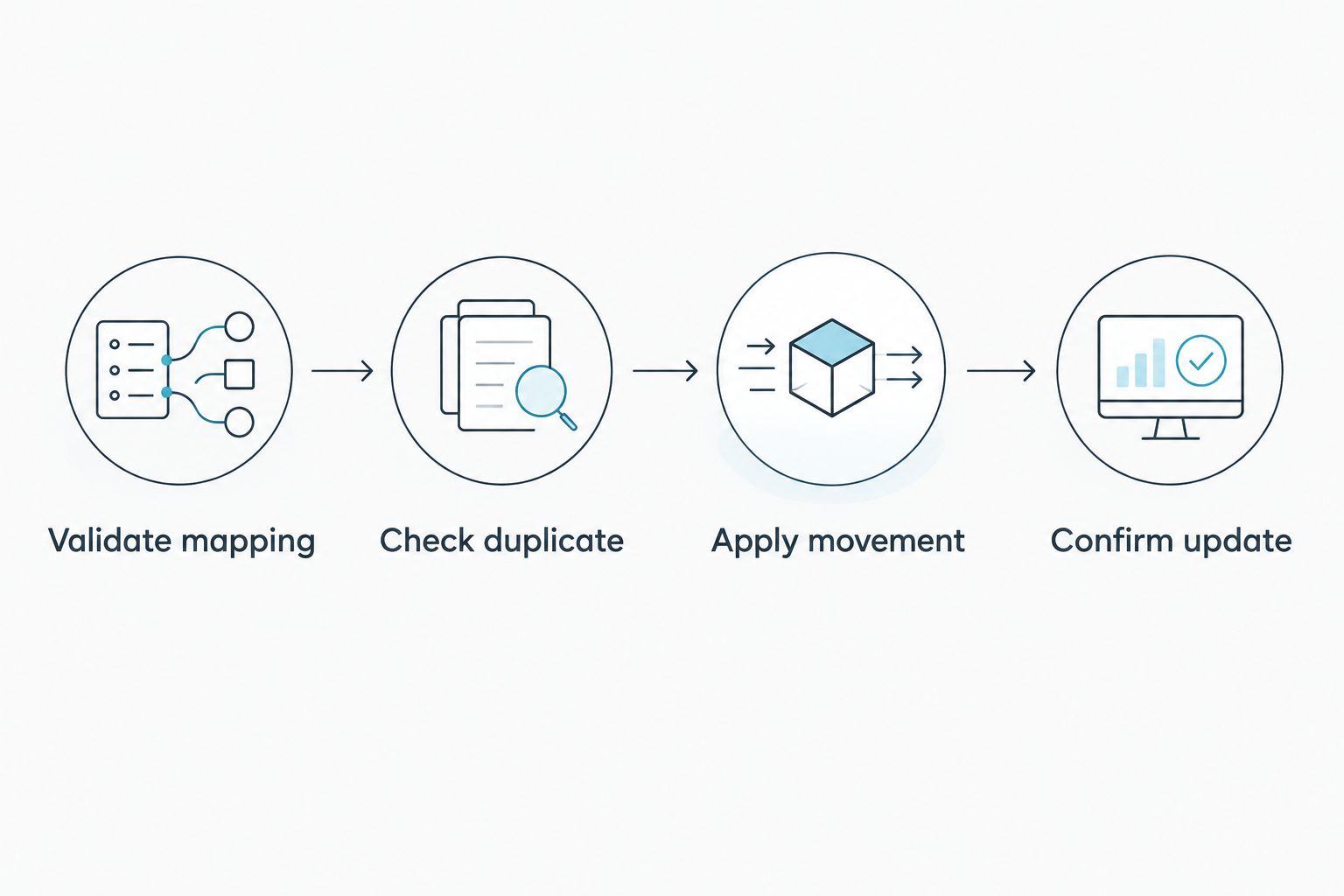
The core processing sequence is Validate mapping, Check duplicate, Apply movement, then Confirm update. Preserve that sequence when designing the connection; publishing success before confirming the write hides failed updates.
Reconciliation and launch configuration
Reconciliation checks the final balance, not just whether messages arrived. Keep it independent of the incremental update path so it can detect errors in that path.
- Compare equivalent snapshots. Compare warehouse and ordering balances at a shared cutoff, using identical SKU, location and stock-status rules. Account for movements still being processed.
- Test a controlled movement. Receive 1 unit into a test location, verify the increase, then reverse the transaction through the warehouse's supported process. Confirm both movements remain traceable.
- Exercise failure handling. Submit the same test movement twice, interrupt an update and introduce an unmapped SKU. Verify that duplicates do not change stock again and failures remain visible.
- Test order allocation. Reserve 1 unit, release it, then test a reservation followed by shipment. Check usable and physical stock separately throughout.
- Approve the cutover. Set a baseline cutoff, retain later movements and enable the new path only after reconciliation passes. Define who can pause ordering and how outstanding movements will be recovered.
Expected result: Your 2026 launch has an approved baseline, recoverable failures and evidence that both stock movements and reservations behave correctly.
Do not keep an old stock-writing connection active alongside the replacement unless ownership is explicitly partitioned. Two independent writers applying the same physical movement create a double-counting risk that retries cannot solve.
Update uniforms when transfers or returns change status
A second workflow covers changes that do not immediately create usable stock. Use the same movement-processing controls, but make status transitions part of the calculation.
For a warehouse transfer, remove the dispatched quantity from the origin's usable balance. Record it as in transit until the destination confirms receipt. Do not expose the quantity as usable at both locations during transit.
For a uniform return, record receipt separately from permission to reissue. Inspection, cleaning or another required disposition can leave a physically present garment outside the usable balance. Only the approved status change should make it orderable again.
Configure this variant as follows:
- Map the source system's transfer and return statuses to your ordering eligibility rules.
- Link related dispatch, receipt and disposition records using their supported references.
- Update usable stock only when the relevant transition makes the item eligible.
- Reconcile physical, in-transit and blocked quantities separately.
Expected result: A returned or transferred garment appears in the correct operational state rather than becoming orderable merely because a record was created.
Troubleshooting
Stock changes twice after a retry
Check whether retries receive a new movement identifier or whether the processed marker is written separately from the balance update. Preserve the original identity and inspect the previous write outcome before retrying. Repair the duplicate through a recorded correction, not an unexplained overwrite.
The right total appears against the wrong sizes
Inspect the SKU mapping for a product-level identifier shared by multiple variants. Replace it with the identifier that distinguishes fulfilment items, then reconcile each affected size. A correct aggregate does not validate variant-level stock.
Ordering stock falls further when an order ships
Check how the reservation is released when physical stock decreases. If the shipment reduces physical stock while the reservation remains active, usable stock receives an additional deduction. Align shipment and reservation-release handling, including recovery when those updates arrive separately.
Transfers create unexplained shortages
Compare origin dispatch, in-transit stock and destination receipt instead of comparing warehouse totals alone. Confirm whether the transfer has actually arrived before repairing a balance. A valid in-transit quantity is not an integration loss.
Balances match but updates arrive late
Trace source transaction time, integration receipt time and destination confirmation time separately. Inspect polling checkpoints, queued failures and destination write errors. For your 2026 service review, report observed delay against the agreed target rather than calling the connection real-time without a measurement.
Customize your workflow
Once stock updates are reliable, add employee entitlement, approved replacement and replenishment rules. Keep those decisions separate from the physical stock ledger: an employee's permission to request a jacket does not create a jacket in the warehouse.
Boolanga's uniform operations scope includes design, manufacturing, distribution and software. Best for enterprises consolidating those responsibilities, that model still requires your team to define stock ownership, exception handling and acceptance criteria. Assess the connection against those requirements rather than assuming that an end-to-end service makes integration automatic.
Use the workflow record to assign responsibility for mapping changes, warehouse corrections, order reservations and failed updates. Review those assignments whenever you add a country, warehouse or uniform programme.
Define your uniform operations scope
Discuss design, manufacturing, distribution and software responsibilities for your uniform programme.
FAQ
What is warehouse management system uniform inventory sync?
Warehouse management system uniform inventory sync connects warehouse stock changes to uniform ordering records. It maps garment variants and locations, processes movements and calculates usable stock using agreed reservation rules.
What's the best way to sync uniform stock in real time?
Use committed warehouse events when the source system supports reliable event delivery and recovery. Otherwise, use incremental polling with checkpoints; both methods need duplicate handling and reconciliation.
Can Boolanga support an end-to-end uniform operations programme?
Boolanga provides design, manufacturing, distribution and software for enterprise uniform operations. Confirm the required warehouse connection, data access and implementation responsibilities directly rather than assuming a particular connector exists.
Should reserved uniforms count as physical stock?
A reservation does not remove a uniform physically from the warehouse. Track physical stock and reservations separately, then calculate usable stock without deducting reservations twice.
How do I stop duplicate warehouse updates?
Retain each source movement's unique identifier and check whether that movement has already been applied. Keep the balance update and processed status consistent so retries cannot repeat a successful deduction.
Should returned uniforms become orderable immediately?
Returned uniforms should become orderable only when their approved status permits reissue. Record physical receipt separately from inspection or other required disposition.
What should I test before launching a uniform stock sync?
Test receipts, shipments, reservations, duplicate delivery, interrupted updates, transfers and returns. Reconcile equivalent stock snapshots and prove recovery before enabling the production workflow.
One last thing
A clean reconciliation can still hide a broken uniform programme if you compare only totals. Equal quantities can conceal the wrong sizes, locations or stock conditions. Make variant-level reconciliation a 2026 acceptance requirement, and require every correction to retain its reason and source reference.