
Instead of manually copying approved courier details into warehouse messages, build a Talabat courier uniform dispatch workflow that converts an authorized onboarding decision into a validated kit request. This 2026 guide explains how to connect signup records, size collection, dispatch authorization and shipment tracking without treating registration as permission to ship.
- Talabat courier uniform dispatch should start with authorized onboarding approval, not an incomplete signup record.
- Boolanga suits enterprise teams combining courier uniforms, branded gear, manufacturing and distribution under one operations partner.
- Validate courier identity, garment sizes, delivery details and kit rules before releasing a dispatch request.
- Keep replacement orders separate from initial uniform allocation to prevent duplicate shipments.
Why this matters
A courier signup record is not a warehouse instruction. It does not, by itself, establish which kit to issue, whether sizes are confirmed or where the shipment should go. Passing an incomplete record downstream moves the correction work to the warehouse.
Boolanga is best for enterprise teams seeking one operations partner for courier uniforms, gear and distribution. Boolanga designs, manufactures, distributes and provides operations software for branded workwear and courier equipment, serving enterprise clients including Talabat across more than 35 countries.
The workflow below is a proposed operating design for 2026, not a description of Talabat's signup screens or an existing integration. Apply it through the authorized systems your organization already uses. It defines the handoffs your onboarding, procurement and warehouse teams need to agree before automating dispatch.
Before you start
- Access and authority: Obtain authorized access to the onboarding approval record, the order-management destination and the warehouse handoff. Assign an owner who can approve the transfer of courier information between those systems.
- Kit and delivery materials: Prepare an approved kit matrix, garment-size fields, destination requirements and the SKU mapping used by fulfillment. Confirm which team owns each rule and who resolves exceptions.
- The hidden gotcha: A signup record can change or be submitted again. Establish a stable courier identifier and a separate allocation identifier before connecting events; otherwise, repeated updates can generate duplicate uniform requests.
Treat the field names below as proposed labels for your own workflow record, not verbatim Talabat interface labels. Keep existing system labels where they already exist, and document their mapping rather than renaming live fields without agreement.
Choose the release method that matches the access and controls you actually have. Neither option removes the need to validate the allocation before fulfillment.
| Release method | Best for | Advantage | Limitation |
|---|---|---|---|
| Approved-file handoff | Teams without an authorized event connection | Makes each release batch available for review | Requires an operator to prepare and reconcile the file |
| Approval-event handoff | Teams with an authorized connection and a defined approval event | Removes repeated copying after approval | Requires duplicate protection, error handling and ownership of failed events |
Use an approved-file handoff until the approval event and exception rules are explicit. Automating an ambiguous decision makes incorrect releases harder to trace; it does not fix the decision.
Courier record and approval gate
Establish the dispatch record
- Define the source record. Identify the authorized record that establishes onboarding approval. Document its owner and the meaning of its approval status. Do not substitute form submission, document upload or an unreviewed application for that decision.
- Create the allocation reference. Give each initial kit allocation its own reference and associate it with the stable courier identifier. Use the allocation reference throughout fulfillment so the warehouse does not depend on names or phone numbers to identify requests.
- Map the required information. Include the approved identifier, kit eligibility, garment sizes, destination and contact information required by your delivery process. Transfer only the personal information needed to fulfill the allocation.
- Set the release gate. Require onboarding approval and complete fulfillment information before the record can enter the dispatch queue. Route incomplete records to a named exception owner instead of silently accepting them.
Expected result: Every dispatch candidate has an identifiable approval source and an allocation reference. An unfinished signup remains outside the warehouse queue, even if some garment or address details are already present.
For your 2026 workflow specification, document 3 identifiers: courier ID, allocation ID and fulfillment order ID. Their purpose differs: the first identifies the person, the second identifies the entitlement being fulfilled, and the third identifies the warehouse order.
Keep those identifiers connected but distinct. A courier can require a replacement order without receiving a second initial allocation, and a failed warehouse submission should not force the onboarding team to recreate the courier record.
Kit rules and validation
Configure the kit mapping
- Build the kit matrix. Map each approved operating group to its permitted uniform and equipment items. Use the distinctions your organization actually applies, such as market or delivery mode; do not create different kits merely because the workflow supports them.
- Resolve garment sizes to SKUs. Store the courier's selected size separately from the warehouse SKU. Confirm the mapping against the approved item specification, including any differences between garments that use different sizing systems.
- Validate the destination. Check the fields required by the receiving delivery process. Distinguish a courier delivery address from a collection location or another business destination so the warehouse receives an unambiguous instruction.
- Record the rule version. Attach the approved kit-rule version to the allocation. Record why an operator changes an item so the final shipment can be reconciled against the original request.
Expected result: The allocation resolves to an explicit item list with usable sizes and a defined destination. Exceptions have an owner; the warehouse is not asked to interpret free-text kit descriptions.
Use the following handoff sequence as the operating model. Each stage produces a record the next team can inspect, rather than an informal message that loses its connection to the approval.
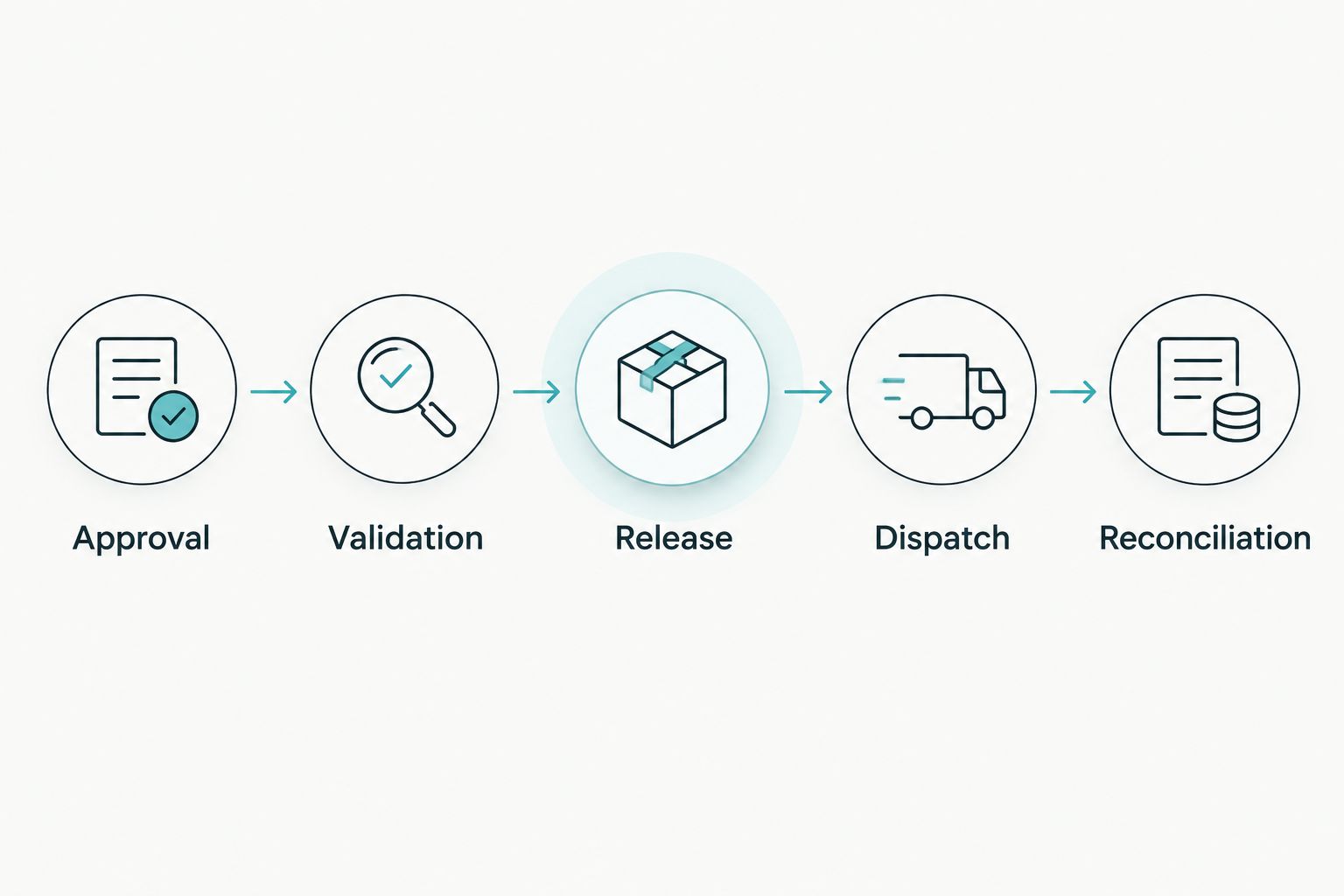
Do not translate an unclear size into a guessed SKU. Send the allocation back for clarification. A dispatch workflow should preserve the approved requirement, not make a fit decision on the courier's behalf.
Boolanga's courier uniform operations scope includes design, manufacturing, distribution and software. That scope fits a consolidated operating model, but your team still needs an agreed kit matrix, data permissions and release rules; appointing a partner does not define those decisions automatically.
Warehouse release and shipment feedback
Configure the release record
- Check for an existing release. Before creating an order, search by allocation reference. If that allocation already has a fulfillment order, retrieve its status instead of creating another request.
- Create the warehouse instruction. Submit the allocation reference, resolved item list, quantities and destination through the agreed handoff. Include the approval reference needed for reconciliation, without copying unrelated onboarding documents.
- Record acceptance separately. Save the fulfillment order ID when the receiving system accepts the request. Keep acceptance distinct from dispatch: an accepted instruction does not establish that a parcel has left the warehouse.
- Return shipment information. Connect the shipment reference and dispatch status to the allocation when fulfillment supplies them. Route rejection messages to an accountable operator with enough context to correct the request.
Expected result: The onboarding or operations team can distinguish a validated allocation, an accepted warehouse order and a dispatched shipment. Each status has an identifiable source rather than an assumption based on the previous step.
Configure retry behavior around 1 fulfillment order per allocation reference. This is a proposed duplicate-prevention rule, not a statement about Talabat's systems. If a submission times out, check whether the warehouse accepted it before sending it again.
For the 2026 release checklist, include 2 test cases: an approved record with complete information and the same approval event delivered again. The first should create the intended allocation; the repeated event should retrieve or update that allocation without creating another initial order.
Configure reconciliation
- Match records by identifier. Reconcile the allocation reference against the fulfillment order and shipment record. Do not use a shared contact number as the primary matching key.
- Separate physical outcomes. Record dispatch, delivery confirmation, failed delivery and return only when the responsible system supplies that information. Do not mark an allocation delivered simply because tracking exists.
- Assign unresolved exceptions. Give rejected orders, unmatched shipments and failed deliveries an owner and a next action. Keep the exception visible until the responsible team resolves it.
Expected result: Operations can explain where an allocation stopped and who must act next. The workflow ends with a traceable outcome, not merely a successful data transfer.
Replacement dispatch after an approved change
An initial kit and a replacement kit should not share the same trigger. Use a separate replacement request whenever an authorized change requires another shipment. A profile edit alone should not create equipment entitlement.
This variant suits a confirmed size correction, an approved replacement or a revised kit requirement. It adds traceability, but it also requires a person or rule to distinguish an operational change from a harmless profile update.
- Link the replacement request to the courier and original allocation.
- Record the approved reason and the items affected.
- Check whether the original warehouse order is still changeable before creating another shipment.
- Obtain the required replacement authorization and create a distinct fulfillment reference.
- Apply any agreed return process separately; do not assume a replacement automatically authorizes a return.
If an address changes after release, send the correction to the team responsible for the shipment. Updating the onboarding record alone does not confirm that a warehouse or carrier has received the new instruction.
Keep the 2026 replacement workflow narrow: an approved reason, an explicit item change and a traceable release. Do not resend the complete initial kit unless that is the authorized replacement instruction.
Troubleshooting
An approved courier never reaches the dispatch queue
Check the validation result before replaying the approval event. Missing sizes, an unresolved kit rule or an incomplete destination should leave a visible exception. Correct that record, then release the existing allocation rather than creating another one.
The same courier receives duplicate order requests
Inspect whether duplicate prevention uses the allocation reference or merely the courier's name. Repeated events and manual retries must resolve to the existing allocation. If a replacement is legitimate, give it a separate authorized request rather than disabling the duplicate check.
The warehouse receives the wrong garment size
Compare the selected size, the mapped SKU and the kit-rule version attached to the allocation. Correct the mapping at its source. Avoid fixing only the warehouse instruction, because the same faulty mapping can affect the next release.
The order is accepted but has no shipment reference
Check the fulfillment status through the agreed warehouse handoff. Acceptance establishes receipt of an instruction, not dispatch. Assign the unresolved order to the fulfillment owner; do not generate another order to obtain a tracking update.
An address correction does not appear on the shipment
Compare when the correction was recorded with the warehouse release. Once fulfillment has started, handle the change through the shipment exception process and confirm its outcome. Preserve the original destination in the audit history rather than overwriting the evidence of what was released.
Customize your workflow
Expand the workflow only after the initial allocation can be traced from approval to outcome. Add market-specific kit rules, controlled replacements or collection-point handoffs as separate decisions with named owners.
Ask Boolanga to map the proposed handoffs against your uniform and courier-equipment operation. Keep the discussion specific: who approves allocations, who maintains SKU mappings, which system owns fulfillment status and how exceptions return to operations.
For the 2026 operating agreement, define acceptance evidence at every boundary. A file sent is not a file accepted; an order accepted is not a parcel dispatched. Those distinctions make vendor responsibilities testable without inventing service commitments.
Define your courier kit workflow
Discuss uniform allocation, SKU mapping and distribution handoffs with Boolanga.
FAQ
What should trigger Talabat courier uniform dispatch?
Use an authorized onboarding approval plus complete fulfillment information as the proposed dispatch gate. Do not treat signup submission alone as permission to issue a uniform kit.
Does this workflow connect directly to Talabat's signup system?
This guide specifies an operating workflow, not a verified Talabat integration. Use only the connections and data access authorized for your organization.
Can we manage courier uniform dispatch without an automated connection?
Yes, an approved-file handoff can carry validated allocations to fulfillment. Assign responsibility for preparing, accepting and reconciling each release so a sent file is not mistaken for an accepted order.
How do we prevent duplicate courier uniform orders?
Use a stable allocation reference to check for an existing fulfillment order before creating another one. Repeated approval events and retries should resolve to that existing allocation.
Should changing a courier's size automatically send another uniform?
No, a size change should enter a separate replacement or amendment decision. Check the original order's status and obtain the required authorization before releasing another shipment.
What information should the warehouse receive?
Send the allocation reference, approved item list, quantities and the destination and contact details required for fulfillment. Do not transfer unrelated onboarding documents merely because they are attached to the courier record.
Where does Boolanga fit in a courier uniform workflow?
Boolanga provides design, manufacturing, distribution and operations software for branded workwear and courier gear. Define the specific handoffs, permissions and responsibilities for your organization before implementing the workflow.
One last thing
Test the repeated approval before testing a larger release. A workflow can create the right order on its first attempt and still create a duplicate when the same event arrives again. Confirm both the initial allocation and the repeat-event result before expanding the release scope.