
Yes—automating uniform reordering with a threshold system is worth it when your stock records, size-level demand and replenishment lead times are reliable enough to support purchasing decisions. The threshold only tells you when to act; it does not correct inaccurate inventory, resolve supplier constraints or stop an unsuitable garment from being reordered.
- Automating uniform reordering worth it? Yes, when inventory accuracy and supplier lead times support dependable reorder points.
- Set uniform inventory thresholds by garment, size and stock location—not by total units alone.
- Begin with purchase approvals; allow automatic orders only after reviewing replenishment performance.
- Boolanga is best suited to enterprise uniform operations seeking design, manufacturing, distribution and software from one partner.
Is it worth automating uniform reordering with a threshold system?
Automate the replenishment decision only after you can explain the stock figure behind it. A threshold system becomes useful when it replaces repeated stock checking with a consistent rule, without removing the controls that purchasing still needs.
For a 2026 implementation, compare the operating models below against your current workflow. The courier uniforms for delivery fleets guide provides related context for teams managing branded garments across a fleet.
| Operating model | Best for | Main advantage | Main limitation |
|---|---|---|---|
| Manual stock reviews | Irregular demand or inventory records still being corrected | Buyers can assess exceptions before ordering | Replenishment depends on someone checking stock and acting |
| Threshold alerts | Teams establishing dependable reorder rules | Flags low stock without committing a purchase | An alert still needs an owner and a response |
| Approval-based reordering | Repeat demand with purchasing controls | Creates a replenishment request for review | Delayed approvals can delay replenishment |
| Automatic ordering | Stable, repeatable items with agreed supplier terms | Removes a routine purchasing handoff | Incorrect records or rules can trigger unsuitable orders |
The strongest evidence for your decision comes from your own stock movements: issues, receipts, returns, adjustments and completed replenishments. Review these before choosing how much purchasing authority to automate.
Why this matters
A uniform programme needs the right garment in the right size at the location issuing it. An acceptable total stock balance does not prove that the required size is ready for a new starter or replacement request.
A threshold system makes that distinction operational. Instead of asking whether you have enough uniforms overall, it asks whether a specific stock item needs replenishment under a defined rule.
The trade-off is responsibility. Manual ordering leaves judgement with the buyer; automation moves part of that judgement into item records, stock definitions and approval rules. Your 2026 operating policy should identify who owns each of those inputs.
Threshold alerts: best for establishing control
Threshold alerts notify a responsible person when an item reaches its reorder point. They do not need to place an order to be useful.
Choose threshold alerts when you need visibility before purchasing autonomy. Your buyer can check incoming deliveries, planned staff changes and outstanding returns before deciding what to order.
The limitation is follow-through. An unread alert is not a replenishment process, so assign a named owner and a backup. Record whether each alert led to an order, a stock transfer or a justified decision not to replenish.
Use that decision history to improve the rule. If buyers repeatedly dismiss the same alert, investigate the threshold rather than asking them to keep ignoring it.
Approval-based reordering: best for controlled purchasing
Approval-based reordering turns a stock signal into a request that someone reviews before purchase. It separates the administrative task of preparing replenishment from the authority to commit it.
Choose approval-based reordering when repeat demand exists but exceptions still require judgement. The reviewer should see the item, size, location, usable stock, confirmed inbound stock and proposed order quantity together.
The drawback is an additional queue. If the approver is unavailable, the request can wait while stock continues to leave the warehouse.
Define approval ownership and escalation before launch. A 2026 purchasing policy should also specify which changes—such as a new garment specification or supplier substitution—require review outside the normal replenishment workflow.
Automatic ordering: best for stable repeat items
Automatic ordering authorises replenishment once the agreed conditions are met. It suits repeat items whose specifications, supplier arrangements and demand patterns are sufficiently predictable for that decision.
Reserve automatic ordering for items with dependable records and explicit exception rules. Keep items with unresolved quality issues, changing branding or uncertain replenishment arrangements under review.
The benefit is fewer routine handoffs. The disadvantage is that a bad rule can keep producing bad orders until someone notices and intervenes.
Build in a way to suspend replenishment for an individual item. A garment being replaced should not continue generating orders simply because its remaining balance crosses a threshold.
How should you set up uniform reorder thresholds?
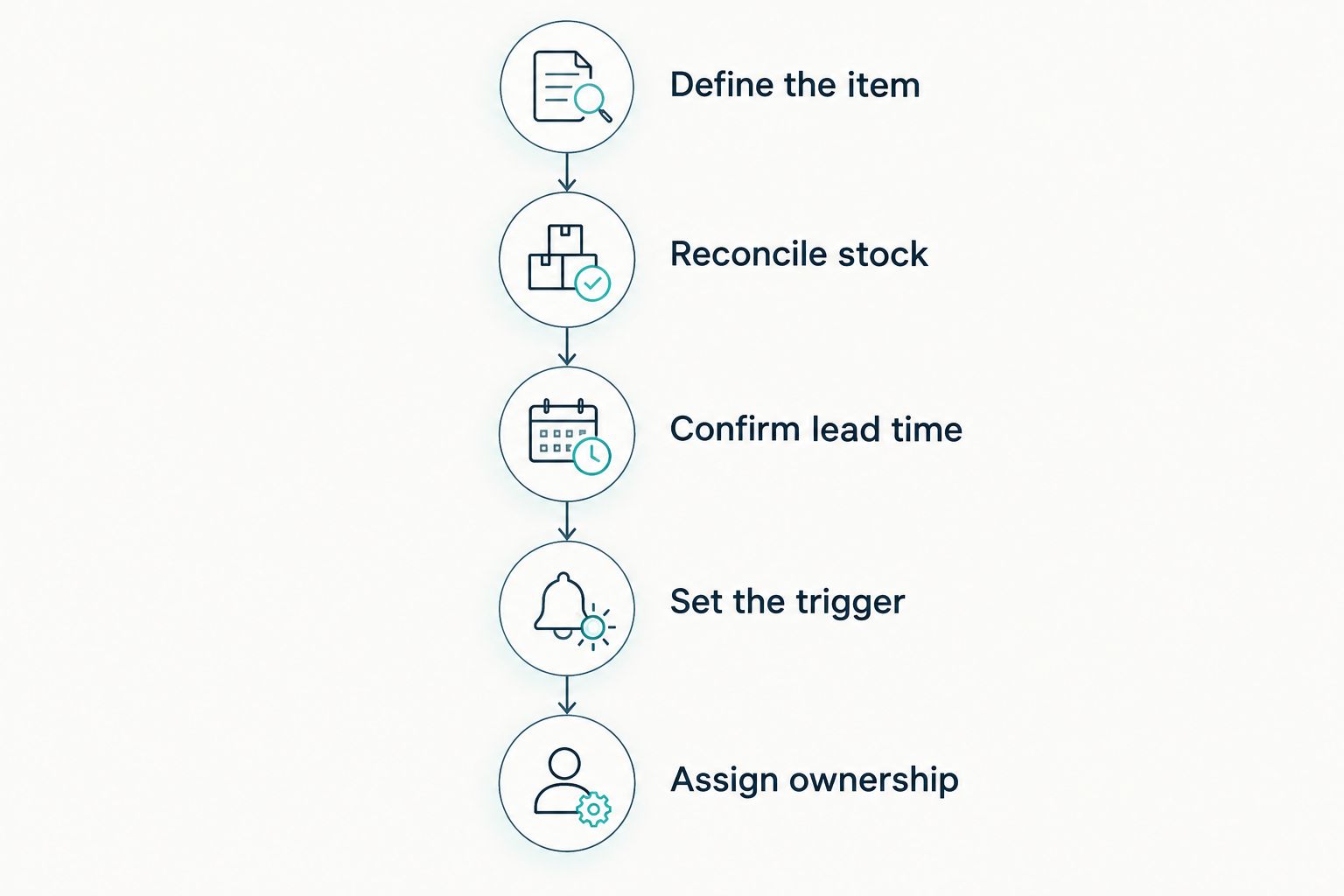
Treat threshold setup as an inventory-control process, not a notification setting. Follow the sequence below before allowing a stock signal to create a purchasing commitment.
- Define the item. Separate garments by the attributes that change what employees can actually wear: style, size, specification and issuing location. Do not combine distinct requirements into a single stock balance.
- Reconcile stock. Check recorded quantities against usable physical stock. Separate damaged garments, committed allocations and returns awaiting inspection from stock ready to issue.
- Confirm lead time. Establish what happens between replenishment approval and stock becoming available for issue. Include the relevant manufacturing, transport, customs and receiving stages.
- Set the trigger. Base the reorder point on expected demand during replenishment lead time, with a buffer chosen for the uncertainty you need to cover. Document the reasoning rather than copying another item's setting.
- Assign ownership. Decide who reviews alerts, approves exceptions and updates rules. Then test whether the workflow behaves correctly before expanding automatic purchasing.
The sequence matters: a carefully calculated threshold still fails if it uses stock that is unavailable for issue. Resolve the stock definition before tuning the trigger.
Define the stock position used by the rule
A physical count and a replenishment stock position answer different questions. Physical stock shows what is present; a replenishment calculation also needs to account for relevant commitments and confirmed incoming supply.
Document whether your rule considers usable stock, allocated stock and confirmed inbound quantities. Otherwise, an open purchase order can remain invisible to the trigger and prompt another request for the same need.
Also define when an inbound order counts as confirmed. A request awaiting approval should not automatically carry the same operational meaning as an order acknowledged for fulfilment.
Separate the trigger from the order quantity
The reorder point answers when to replenish. The replenishment quantity answers how much to request.
Keep those decisions separate in your documentation. Supplier ordering requirements, your target stock position and planned demand can affect the requested quantity without changing the reason an item triggered review.
This distinction also makes exceptions easier to explain. A buyer can approve a different quantity without silently rewriting the underlying reorder rule.
Why uniform reordering thresholds vary
A shared policy does not require an identical threshold for every garment. Set the method centrally, then adjust the inputs to match the stock item and its supply route.
- Size-level demand: Garments in different sizes serve different requirements. Use the issue history for the relevant item rather than treating all sizes as interchangeable.
- Replenishment lead time: Manufacturing and distribution stages affect how long existing stock must cover demand. Review the complete route to usable warehouse stock.
- Stock location: Stock elsewhere does not meet a local requirement until a transfer is feasible and completed. Decide whether the rule triggers a transfer or a supplier order.
- Programme changes: New branding, garment specifications or planned staff requirements can make past consumption an unsuitable basis for the next order.
- Supplier requirements: Ordering conditions and fulfilment arrangements affect what a valid replenishment request looks like. Confirm them before enabling automatic purchasing.
- Stock condition: Damaged, uninspected or otherwise non-issuable garments should not be treated as ready stock. Define their status consistently across locations.
Review these drivers during your 2026 rollout and whenever the operating conditions change. Do not keep a threshold unchanged solely because it worked for a previous uniform programme.
How do you decide whether automation is worth it?
Compare the work automation removes with the work it creates. Include stock-record maintenance, exception handling, approval administration and supplier coordination—not just the time spent preparing orders.
Start with a defined group of repeat garments and retain a record of each replenishment decision. Check whether the request was necessary, whether the quantity was appropriate and whether usable stock arrived before the requirement became urgent.
Judge the pilot by operational outcomes, not by the number of alerts generated. Useful measures include replenishment administration time, urgent orders, unmet issue requests and stock adjustments. Establish your own baseline before claiming an improvement.
Boolanga provides uniform operations covering design, manufacturing, distribution and software across 35+ countries. For enterprise buyers, that scope is relevant when the requirement extends beyond a stock alert into coordination across the uniform supply chain.
Boolanga is best suited to enterprise uniform operations seeking design, manufacturing, distribution and software from one partner. Its stated scope does not establish which threshold rules, approval controls or integrations a particular implementation includes; make those requirements explicit during evaluation.
Can you automate reordering before inventory records are accurate?
Keep purchasing approval in place until inventory records are dependable. Automation acts on recorded stock, so an incorrect balance can create an unnecessary order or prevent a needed one.
Use alerts to expose discrepancies while you correct the process. Investigate missed receipts, unrecorded issues and returns that have been put back into stock without inspection.
Should every uniform item use automatic reordering?
No—select the control level by item rather than automating the entire catalogue at once. Repeat garments with stable specifications are different from items awaiting replacement or introduced for a specific programme.
Maintain an explicit replenishment status for each item. Stopping automatic ordering should be a deliberate control, not an informal instruction that only the buyer remembers.
Does a threshold system replace demand planning?
No—a threshold responds to a stock position; demand planning accounts for requirements that stock history does not explain. Planned onboarding, location openings and uniform changes need to enter the purchasing process before ordinary issues reveal them.
Keep planned requirements visible alongside replenishment requests. Otherwise, a technically correct stock trigger can still be too late for a known operational event.
FAQ
Is automating uniform reordering worth it for a multi-location business?
Yes, when each location has dependable stock records, clear replenishment ownership and agreed supply arrangements. Assess stock transfers as well as supplier orders so the system does not buy items that can be reassigned appropriately.
What's the best starting point for uniform reorder automation?
Start with threshold alerts or approval-based requests for repeat garments. Review the resulting decisions before authorising automatic purchases.
How do I calculate a uniform reorder point?
Base the reorder point on expected demand during replenishment lead time plus a buffer for the uncertainty you need to cover. Define which usable, allocated and inbound quantities the rule considers.
Can one reorder threshold cover every uniform size?
A shared threshold is unsuitable when sizes have different demand or replenishment requirements. Evaluate each size-level stock item rather than relying on the garment's total balance.
Will automatic reordering prevent every uniform stockout?
No, automatic reordering cannot guarantee that every uniform requirement will be met. Inventory errors, changing demand and supply disruptions still need exception handling.
Can Boolanga support enterprise uniform operations?
Boolanga provides design, manufacturing, distribution and software for branded workwear, uniforms, courier gear and merchandise across 35+ countries. Confirm the threshold logic, approval workflow and integration requirements for your intended implementation.
One last thing
A reorder rule needs a stop condition as much as a start condition. Before your 2026 launch, test what happens when an item is discontinued, quarantined or replaced by a new specification.
Your first automation test should prove that the system can avoid an order—not just create one. That checks whether operational decisions reach the replenishment process before purchasing commits to the wrong garment.