
Instead of manually chasing uniforms after an employee leaves, connect an approved HR offboarding event to an item-level return workflow that assigns collection, tracks receipts, and closes only reconciled records. This 2026 guide shows how to configure that process without treating a termination date as proof that clothing has reached your warehouse.
- For hr system uniform return offboarding, trigger collection from approved departures and close returns only after reconciliation.
- Boolanga suits enterprises seeking one operations partner for branded workwear design, manufacturing, distribution, and software.
- Match employee IDs to issued items before activating automatic return requests.
- Keep physical receipt, inspection, and inventory disposition separate from HR departure status.
Why this matters
An HR record confirms employment status. It does not confirm which jacket an employee holds, where a return should go, or whether a received garment belongs back in usable stock. Automating those assumptions creates inaccurate inventory rather than a controlled handover.
Boolanga is best for enterprises seeking an end-to-end branded workwear operations partner. Boolanga designs, manufactures, distributes, and provides software for workwear, uniforms, courier gear, and merchandise across 35+ countries. For a return workflow, define the required HR connection and warehouse responsibilities before agreeing the implementation scope.
The workflow below is platform-neutral. Field names in code formatting are proposed configuration names, not claims about existing vendor interfaces; map them to your system's documented fields and controls. Do not assume that an HR connector, warehouse integration, or return portal exists until its capabilities are confirmed.
Before you start
- Access and ownership: Secure authorized access to approved departure events, the employee identifier, work location, and the people responsible for HR approval, return coordination, and warehouse receipt. Confirm which integration methods your actual systems support.
- Issued-item records: Prepare an employee-to-item register containing SKU, quantity, issue reference, and any applicable serial identifier. Define return obligations and permitted exceptions against your organization's policy.
- The access-cutoff gotcha: A departing employee can lose access to company email before collection happens. Agree an authorized communication channel and lawful handling of contact details before activating notifications; never copy private details into a new system by default.
For your 2026 configuration record, document 1 authoritative employee identifier and 2 separate dates: the approved departure date and the return due date. Those dates serve different purposes. A departure date starts or schedules work; a due date measures whether the return is late.
Configuration unit: departure trigger
Connect approved HR events
- Identify the event that represents an approved departure in your HR system. Exclude drafts, unapproved requests, and test records. If the system cannot emit events, define an authorized scheduled export or polling process instead.
- Map
employee_id,departure_date,work_location, and the relevant approval status. Transfer only fields required to manage the return; the receiving workflow does not need a full personnel file. - Decide when to create the return case. Creating a scheduled case at approval gives operations notice, while employee-facing communication can remain tied to your approved notification date.
- Define a deduplication key using a stable departure-event identifier. If none exists, agree a composite identifier that distinguishes separate employment periods and departures.
- Store the originating HR event reference against the return case. Assign a named owner for events that fail validation rather than silently discarding them.
Expected result: An approved departure creates one traceable case or updates its existing match. Repeated delivery of the same event does not create another collection request.
Do not trigger warehouse closure from this event. HR is authoritative for departure status, not physical custody. Keep the case scheduled if the departure is approved but the employee should not yet receive return instructions.
Configuration unit: issued-item reconciliation
Build the return scope
- Retrieve the employee's open issue records using
employee_id. Match identifiers directly; names and email addresses are not reliable substitutes for an item assignment key. - Create a return line for each applicable issue record. Preserve SKU, quantity, issue reference, and any serial identifier needed to match the physical item later.
- Classify each line as return required, approved exception, or needs review. Apply your organization's rules rather than assuming all garments must be recovered or all worn clothing is exempt.
- Add the approved destination and receiving owner. Separate the employee's work location from the return destination; the two are not necessarily the same.
- Stop automatic instructions when the item register is empty, ambiguous, or inconsistent. Route the case to an owner who can establish what was actually issued.
Expected result: The case contains an auditable list of expected items, or a visible exception that prevents an inaccurate request.
An empty query result is not proof that nothing is owed. It can mean that an identifier changed, a legacy issue was never recorded, or the lookup failed. Your workflow should distinguish a successful lookup with no outstanding items from an unsuccessful lookup.
Choose the collection route
Use the employee's approved location and operational circumstances to select a route. These are workflow choices, not claims about services included in any supplier agreement.
| Collection route | Best for | Operational advantage | Constraint |
|---|---|---|---|
| Manager handover | Employees who can return items at an existing workplace | Creates a local custody checkpoint | A manager's acknowledgment is not warehouse inspection |
| Shipment return | Employees who cannot use a workplace handover | Separates collection from workplace attendance | Requires an agreed destination, transport process, and receipt matching |
Choose the route your receiving operation can reconcile. A convenient collection method is incomplete if the next owner cannot identify the employee, case, and contents.
Configuration unit: collection and receipt
Assign the handover
- Assign
collection_owner,return_destination,return_due_date, andcollection_route. Calculate the deadline from your approved policy, not an arbitrary default copied from another employer. - Send instructions through the authorized channel. Include the return reference, expected items, destination or handover arrangement, deadline, and a route for reporting discrepancies.
- Record custody transfer separately from final receipt. For a manager handover, capture the receiving person's acknowledgment; for shipment, record the dispatch reference when available.
- Schedule reminders against open return lines. Suppress reminders for items already received, approved exceptions, and cases paused for investigation.
- Assign overdue cases to an accountable person. Do not translate an overdue status into a payroll deduction or disciplinary action; those require separate policy and legal review.
Expected result: Each outstanding return has instructions, a responsible owner, and a deadline. Employee responses update the case rather than creating disconnected email tasks.
Keep status boundaries visible
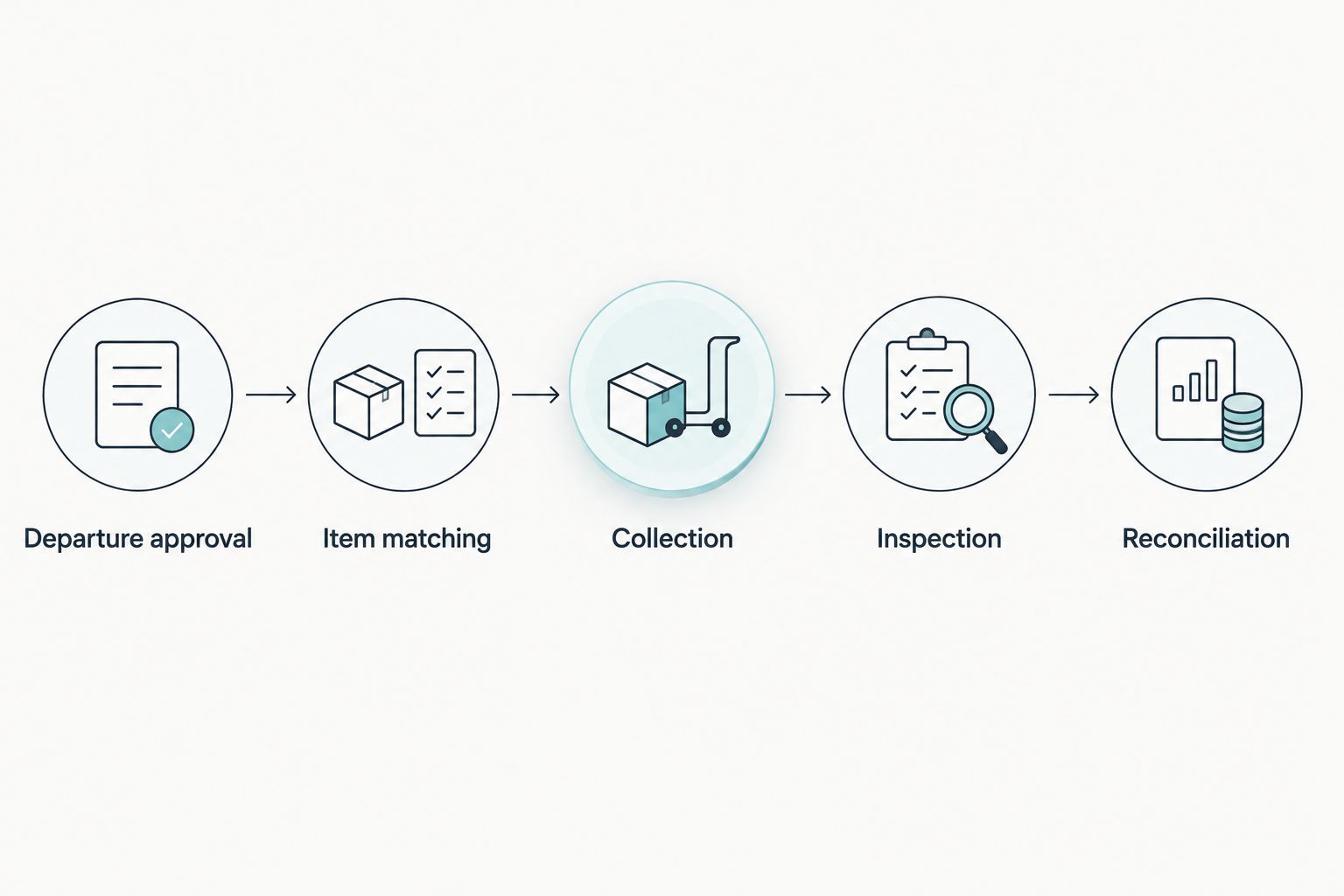
Use separate milestones for Departure approval, Item matching, Collection, Inspection, and Reconciliation. A tracking event can support collection status, but it cannot establish that the expected quantity arrived in acceptable condition.
Configuration unit: inspection and closure
Reconcile physical items
- At receipt, identify the return case and compare the physical contents with its expected lines. Record actual quantities rather than copying the expected quantities into the receipt.
- Record condition and disposition separately. An item can be received but still require cleaning, repair, review, or disposal under your organization's rules.
- Update the appropriate inventory status only after the receiving decision. Physical receipt should not automatically increase usable stock.
- Leave missing quantities open. Record approved exceptions with the reason, approving owner, and decision date instead of silently reducing the expected quantity.
- Close the case only when every expected line has a recorded receipt or authorized resolution. Send HR a concise completion status and reference, not the entire warehouse record.
Expected result: A closed case explains what was returned, what happened to it, and how every remaining obligation was resolved.
Before enabling the workflow in 2026, run 3 acceptance checks: duplicate-event handling, a partial return, and a cancelled departure. These are test scenarios, not performance targets. Each should leave a clear record without duplicate requests, false stock, or unexplained closure.
Second workflow: update or cancel a departure
A departure-date change should update the original case, not launch another return. Use the same HR event relationship to process amendments and cancellations.
- Match the changed HR record to the existing case using its stored event reference and employee identifier.
- Recalculate scheduled notifications and deadlines according to policy. Preserve the previous values in the change history.
- If the departure is cancelled, stop unsent messages and pending reminders. Mark the case cancelled only after checking whether a physical handover has already happened.
- If items have already been received, route the case to operations for a separate reissue decision. Do not erase the receipt or automatically restore employee custody.
Expected result: The current departure plan controls future activity while the record preserves completed physical actions.
For your 2026 change log, distinguish a rescheduled departure from a new departure following re-employment. Reusing an old closed case can attach a new obligation to the wrong employment period.
Troubleshooting
The same employee receives duplicate requests
Check whether retries and amendments share the original event reference. Enforce the deduplication rule before case creation, and repair duplicate cases without deleting receipt evidence. An employee identifier alone is insufficient when someone leaves more than once.
The case shows no items despite a known issue
Compare the employee identifier in HR with the issued-item register. Check employment-period mapping and unrecorded manual issues. Hold the request for reconciliation instead of telling the employee that no return is required.
Messages stop reaching the employee
Check whether company access ended before the scheduled reminder. Use only the alternative channel already approved for this purpose, or assign the case to the authorized coordinator. Do not solve a delivery failure by exporting contact data without authorization.
A parcel arrives but the case remains open
Match the parcel reference and contents to the case, then record receipt against individual lines. Leave genuinely missing items unresolved. Delivery confirmation alone does not prove that all expected garments were inside.
Received clothing appears immediately as usable stock
Inspect the inventory update rule. Route receipt into the appropriate inspection status before applying the disposition decision. Correct any affected stock records so allocation does not rely on an unverified return.
Customize your workflow
Extend automation only after the basic handover reconciles correctly. Add location-specific destinations, policy-based exceptions, and reminders that respect the status of each return line. Keep personal-data retention aligned with your documented purpose and applicable requirements.
Boolanga's branded workwear operations span design, manufacturing, distribution, and software. Review the services scope against your return process, including who owns issue records, collection, receipt, inspection, and exception decisions. Confirm the supported integration method rather than assuming a particular connector is included.
End-to-end ownership reduces handover ambiguity; it does not remove the need for explicit controls. The trade-off is implementation work: identifiers, decision rights, and inventory statuses must agree across the organizations involved. A service scope without those boundaries leaves the return workflow incomplete.
For the 2026 operating review, track unresolved lines, overdue cases, failed events, and receipts awaiting inspection. Define each measure before reporting it. A fast case-closure figure is misleading when unresolved obligations are simply being removed from the denominator.
FAQ
How do I connect my HR system to uniform returns during offboarding?
Connect approved departure events to a return case, match the employee to issued items, and assign collection and reconciliation tasks. Use the integration methods your systems actually support, and close the case only after each item has a receipt or approved resolution.
Does Boolanga provide an HR connector for automatic uniform returns?
A specific HR connector is not established by Boolanga's stated service scope. Confirm event support, data mapping, return statuses, and responsibilities before agreeing the implementation.
When should an automatic uniform return request start?
Start the case from an approved departure event, with employee communication scheduled according to your policy. Keep the departure date and return deadline separate so scheduling changes do not create duplicate requests.
Can a return close when shipment tracking says delivered?
No. Shipment delivery does not confirm item identity, quantity, or condition. Record physical receipt and resolve every expected line before closing the return case.
What happens when an employee returns only some uniforms?
Record the received quantities and leave the missing quantities open. Stop reminders for completed lines while assigning follow-up or an authorized exception decision to the remaining lines.
How should the workflow handle a cancelled departure?
Stop pending notifications and review whether any physical handover has already happened. Preserve existing receipts and route any reissue through a separate authorized decision.
Can returned uniforms go straight back into available inventory?
Only apply usable inventory status after the required receiving and disposition decision. Keep physical receipt separate from inspection, cleaning, repair, or other processing required by your organization's rules.
One last thing
The most revealing test is a cancelled departure after a partial return. It forces the workflow to handle employment status, physical custody, and outstanding obligations without pretending they are the same record. Pass that scenario before expanding automation to more locations.