
Instead of manually translating employee measurements into uniform sizes, connect a size-prediction service to your ordering platform through a controlled recommendation, confirmation and SKU-mapping workflow. Keep the recommendation separate from the order until the employee confirms it and the platform validates the exact garment variant.
- AI uniform size prediction integration connects employee measurements, garment sizing data and orderable SKUs—not just two applications.
- Boolanga suits enterprise uniform programmes that need design, manufacturing, distribution and operations software under one partner.
- Require employee confirmation before turning a predicted size into an order line.
- Treat missing mappings and prediction failures as exceptions, never as permission to guess a size.
Why this matters
A predicted medium is not an orderable item. Your platform needs the correct garment, cut, sizing region and size variant before it can create a valid order line.
Boolanga provides branded workwear, uniforms, manufacturing, distribution and operations software across 35+ countries. Boolanga is best for enterprise uniform programmes seeking one partner across design, manufacturing, distribution and operations software. The connection described here is an implementation blueprint, not a claim that a particular prediction connector is included.
For a 2026 rollout, define the integration contract before choosing where the prediction appears. A successful API response is not enough: the recommendation must resolve to the intended garment variant, survive employee confirmation and remain traceable through ordering.
Before you start
- Secure access and ownership. Obtain documented integration access for the prediction service and ordering platform, a test environment, and named owners for catalogue data, ordering and employee-data handling. Confirm supported authentication and event mechanisms before development.
- Prepare garment-specific sizing data. Collect approved size charts, measurement instructions, garment identifiers, variant SKUs and chart versions. Establish who can approve a changed chart or replace a discontinued variant.
- Resolve the hidden gotcha: size labels are not universal identifiers. A size label alone cannot distinguish garments, cuts or regional sizing systems. Agree the complete mapping key before connecting the systems, and document the permitted purpose, access and retention of employee measurements.
No product-specific administration interface is identified here. The field names below are proposed integration-contract fields, not existing buttons or settings; use each system’s documentation for its actual interface labels and API properties.
Employee and garment records
Establish the input contract
- Choose the ordering context. Identify the employee, selected garment and applicable entitlement before requesting a recommendation. Use an internal employee reference rather than copying unnecessary personal identifiers into every request.
- Define the required inputs. Ask the prediction provider which measurements and garment attributes its service requires. Do not infer required inputs from a generic clothing-size calculator or collect extra measurements without a defined purpose.
- Standardise measurement units. Include an explicit unit with every measurement. Reject unitless values rather than assuming that an entry represents centimetres or inches.
- Separate garment and person data. Maintain a garment record containing the approved chart, cut and sizing region. Keep employee measurements in the appropriate restricted record and pass only the fields the prediction service needs.
- Version the sizing reference. Associate each request with the chart version used to interpret its result. Preserve that version with the recommendation so a later chart change does not silently rewrite the original decision.
The following contract separates the information needed to predict a size from the information needed to order it. It is a design template, not a vendor API specification.
| Proposed field | Purpose | Validation rule |
|---|---|---|
employee_ref | Connect the request to the intended employee | Resolve to an authorised employee record |
garment_ref | Identify the garment being fitted | Resolve to the selected catalogue garment |
measurement_unit | Explain the measurement values | Accept only the units supported by the service |
size_chart_version | Identify the sizing reference | Match an approved garment chart |
recommendation_ref | Track the returned recommendation | Remain distinct from the order identifier |
variant_sku | Identify the orderable garment variant | Match the approved catalogue mapping |
Expected result: you can trace every recommendation to an employee, a garment and the sizing reference used. No order exists yet.
Prediction request and response handling
Connect the recommendation event
- Select an explicit trigger. Request a prediction after the employee selects a garment and supplies the required measurements. Do not trigger on every unrelated profile edit.
- Authenticate through the supported mechanism. Keep service credentials out of browser code and employee-visible forms. Apply the access scope supported by the integration and restrict it to the required operations.
- Assign a request reference. Record which employee, garment and chart version belong to the request. Use that reference to associate the response with the correct ordering session.
- Validate the returned result. Confirm that the response refers to the requested garment and uses an expected size system. Treat an unrecognised size or incomplete response as an exception.
- Handle uncertainty explicitly. If the provider returns confidence information, use its documented meaning. Do not invent a percentage threshold or interpret a score without knowing its scale and intended use.
- Discard stale responses. If the employee changes the garment or measurements while a request is running, do not display the earlier response as current.
Expected result: the ordering session contains a recommendation tied to the current inputs, or a visible exception requiring another action. A failed request never becomes a default size.
Choose the connection pattern
For the 2026 implementation, choose the pattern your systems actually support. These are architectural options, not claims about Boolanga’s existing interfaces.
| Pattern | Best for | Advantage | Limitation |
|---|---|---|---|
| Request-and-response connection | Employee ordering sessions that need an immediate recommendation | Keeps the recommendation close to garment selection | Requires a defined timeout and a usable failure path |
| Asynchronous job | Workflows that can wait for a recommendation | Separates prediction processing from the ordering screen | Requires pending states and protection against stale responses |
| Controlled file exchange | Platforms with supported import and export but no suitable live interface | Provides a connection without assuming live API support | Requires reconciliation and cannot promise immediate results |
Choose the simplest supported pattern that preserves request identity and employee confirmation. A live connection is not automatically better if the platform cannot reliably handle failed or delayed responses.
SKU mapping and employee confirmation
Translate the recommendation into an order line
- Build the mapping table. Map the garment reference, cut, sizing region, chart version and predicted size to the approved variant SKU. Keep the mapping explicit rather than generating SKU strings from size labels.
- Require one unambiguous match. Configure the adapter to accept exactly 1 matching SKU per confirmed garment selection. Zero matches and multiple matches both enter an exception queue.
- Present the recommendation for confirmation. Show the garment, recommended size and relevant sizing guidance. Let the employee confirm or request a different size through the approved process.
- Record an override separately. Preserve the recommendation and the employee’s final selection as distinct values. If an override reason is collected, keep it relevant to fit and avoid unnecessary sensitive detail.
- Validate the final selection. Check the selected variant against catalogue validity, employee entitlement and the platform’s ordering rules. A prediction result does not bypass those rules.
- Create the order line once. Use the ordering platform’s supported duplicate-prevention mechanism. If a request is retried after an uncertain response, check whether it already created an order before submitting again.
Expected result: each accepted order line points to the exact confirmed variant. The prediction remains an input to the decision, not an instruction that silently overrides the employee.
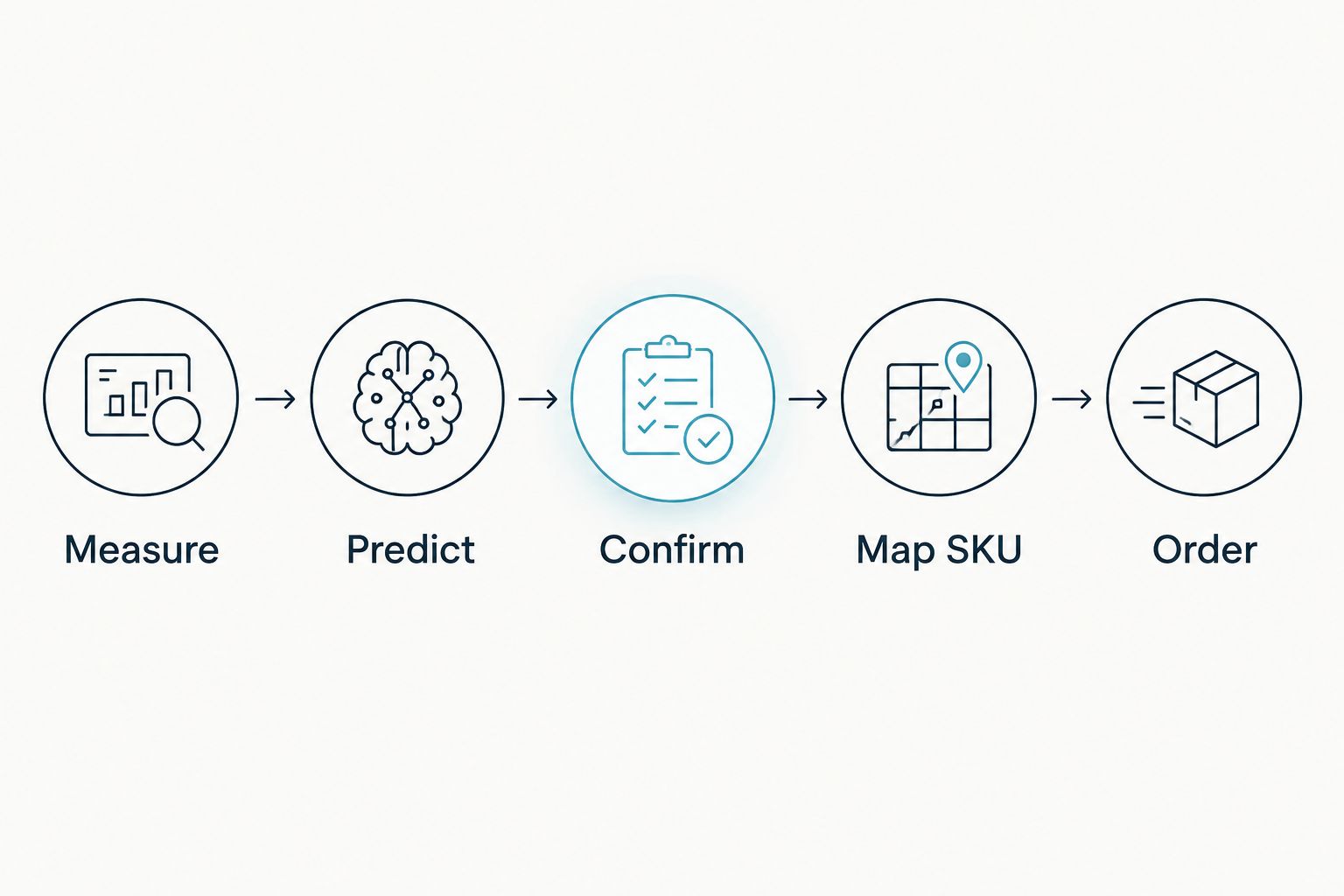
The operational sequence is Measure, Predict, Confirm, Map SKU, Order. Keep each stage visible in the integration record so support staff can identify where a request stopped without reading raw employee measurements.
Exceptions and release testing
Prove the complete ordering path
- Test the normal path. Submit an authorised employee’s test record, obtain a recommendation, confirm the selection and verify the resulting variant in the test order.
- Test both mapping failures. Run 2 mapping test cases: no matching SKU and more than one matching SKU. Neither case should create an order line.
- Test retries and delays. Repeat a submission, interrupt a response and return an older prediction after the garment changes. Verify that the integration neither duplicates an order nor accepts a stale recommendation.
- Test the employee’s choice. Confirm that an approved override reaches the final order without erasing the original recommendation.
- Test access and logs. Verify that support users can diagnose the request state without receiving measurement data they do not need. Keep credentials and unnecessary personal data out of logs.
- Assign exception ownership. Route catalogue mismatches to the catalogue owner, connection failures to the integration owner and unresolved fit questions to the designated uniform-support team.
For the 2026 release checklist, require sign-off on mapping behaviour, employee confirmation, retry handling and data access. Do not treat a successful connection test as approval for production ordering.
Expected result: the system either creates the intended order once or stops with a traceable reason and a named owner.
Recheck sizing when an employee or garment changes
A second workflow handles updated measurements or a revised garment chart. Recalculate the recommendation, not the employee’s existing order.
- Mark the previous recommendation as no longer current when its underlying inputs change.
- Request a replacement recommendation using the updated inputs and chart reference.
- Ask the employee to confirm the new selection before a subsequent order.
- Route changes affecting an already-submitted order through the established amendment process.
This variant suits recurring uniform programmes, but it adds notification and version-management work. Do not run it for unrelated profile changes, and do not assume that a new recommendation authorises a replacement shipment.
Troubleshooting
The service returns a size, but the platform rejects it
Check the complete mapping key, not just the size label. Correct the garment, cut, sizing region or chart reference; do not substitute the nearest-looking SKU to force the order through.
A timeout produces duplicate order lines
Separate prediction retries from order-creation retries. Look up the existing order using the platform’s supported request reference before resubmitting a creation request whose outcome is unknown.
The employee sees an old recommendation
Compare the response’s input reference with the current garment and measurement version. Discard the stale result and retain a pending state until the current request completes or fails.
Measurements look valid, but the recommendation is wrong
Check units, measurement instructions and whether the service expects body or garment measurements. Then verify the approved size chart; a technically valid input is not necessarily the intended measurement.
Employees repeatedly override the recommendation
Group the exceptions by garment and chart version before changing the workflow. Review the sizing inputs, garment specification and override reasons together; do not assume every override proves a model error.
Customize your workflow
Once the base connection works, extend it to role-specific garment sets, regional catalogues and replacement ordering. Keep entitlement rules separate from sizing: the right size does not determine which uniform an employee is authorised to receive.
For a 2026 programme review, compare confirmed recommendations, overrides, mapping exceptions and fit-related returns using consistent definitions. Report only outcomes your records actually capture, and distinguish a sizing issue from an incorrect pick or dispatch.
Boolanga’s uniform operations remit covers the physical and software sides of a programme. Use that scope to frame the handoff discussion: who maintains the chart, who approves the SKU mapping and who resolves an exception after ordering?
FAQ
What is AI uniform size prediction integration?
AI uniform size prediction integration connects employee sizing inputs and garment data to a recommendation service, then maps the confirmed result to an orderable uniform variant. The prediction and the final order remain separate records.
Can size prediction automatically place a uniform order?
Automatic ordering requires explicit business authorisation and separate order validation. The workflow in this guide requires employee confirmation before creating an order line.
Do I need an API to connect a size-prediction service?
You need a connection method supported by both systems, not necessarily a live API. A controlled import-and-export workflow is an alternative when documented interfaces support it, but it requires reconciliation.
Which measurements should employees provide?
Employees should provide only the measurements required by the prediction service for the selected garment. Follow its measurement instructions and record the unit explicitly.
What happens when a recommended size has no matching SKU?
Stop order creation and route the request to the catalogue owner. Never replace an unmapped recommendation with an assumed equivalent size.
Does Boolanga provide this specific size-prediction connector?
A specific size-prediction connector is not confirmed here. Boolanga provides branded workwear, manufacturing, distribution and operations software; confirm the required interfaces and implementation scope directly.
What should change in the integration for a 2026 rollout?
Base the rollout on current interface documentation, approved garment charts and tested ordering rules. The year alone does not establish which prediction features or connection methods a platform supports.
One last thing
Keep the recommended size, confirmed size and dispatched SKU separate. If those values disagree, you need to know whether the problem occurred during prediction, employee selection, catalogue mapping or fulfilment. Collapsing them into one field removes that distinction precisely when support needs it.