
Instead of manually chasing courier sizes, ordering branded gear and checking handovers in separate messages, connect approval, kit allocation and receipt confirmation in one controlled workflow. For your 2026 dark store rollout, release a courier to dispatch only after the required operational checks and gear handover are complete.
- Dark store courier onboarding branded gear needs an approval gate, a kit specification and a confirmed handover.
- Boolanga fits enterprise teams combining branded workwear, courier equipment, manufacturing, distribution and operations software.
- Separate courier eligibility from gear readiness; neither status proves the other.
- Test exceptions before rollout: missing sizes, unavailable kit components, transfers and duplicate requests.
Why this matters
A courier approval does not tell a dark store whether the courier has the right clothing, carrying equipment or collection instructions. A parcel delivery confirmation does not prove that the courier received and checked the kit. Treat eligibility, allocation and handover as separate records.
Boolanga is best suited to enterprise teams that need branded courier gear alongside design, manufacturing, distribution and operations software. Its stated scope covers enterprise clients across 35+ countries; your onboarding process still needs explicit rules for each operating location.
The objective is not another form. It is a traceable connection between the approved courier, the assigned kit and the person authorising dispatch. Your 2026 operating procedure should make that connection visible without searching through messages.
Before you start
- Access and ownership: Identify who controls courier approval, personnel records, kit specifications, warehouse allocation and dispatch release. Give each role access to the records it needs, without exposing unrelated personal information.
- Approved materials: Prepare the courier identifier, operating location, vehicle type, size information, approved branding files, kit specification and handover instructions. Confirm who can approve substitutions before requests reach fulfilment.
- The non-obvious gotcha: Establish a stable courier identifier before connecting systems. Names, email addresses and telephone numbers can change; using them as the only matching key creates a duplicate-record risk.
The bold record labels below are suggested configuration fields, not claims about a particular software interface. Create equivalent fields in your existing systems, then map their actual interface labels in your internal procedure. No specific connector or prebuilt integration is assumed.
Courier record and approval gate
Establish the source record
- Assign Courier ID as the persistent reference for the person. Keep identifiers as text where necessary so formatting does not remove leading zeros.
- Record Operating location, Vehicle type, Planned start date and Courier status. Define which system owns each field rather than allowing every connected system to overwrite it.
- Add Size confirmation and its confirmation date. Ask the courier to confirm the relevant measurements or sizes against the sizing guidance for the selected garments.
- Define Eligibility approved separately from Gear ready. Let the authorised onboarding owner set eligibility; let fulfilment and handover evidence determine gear readiness.
- Assign an Exception owner for records that cannot proceed. A missing size must create an actionable exception, not disappear into an unmonitored queue.
Expected result: Each courier has 1 authoritative record, and approval does not automatically imply that equipment has been issued. A store supervisor can identify the next owner without asking the courier to repeat information.
Define the release rule
Set the gear-request trigger to an approved status transition, not the creation of an incomplete courier profile. The request should contain the courier identifier, the applicable kit version and the destination needed for fulfilment.
For your 2026 launch, write the release rule in plain language: dispatch authorisation requires confirmed eligibility, the required training or operational approvals, and completed gear handover. Keep those checks distinct so a clothing exception cannot silently override another requirement.
Kit specification and allocation rules
Build the kit matrix
- Group kit requirements by Operating location, Vehicle type and Role. Add seasonal or weather-related rules only where your operations team has defined them.
- Give every approved combination a Kit version. List its component SKUs, garment sizes and mandatory items; distinguish operational requirements from optional merchandise.
- Record Branding approval against the applicable specification. Do not assume that an approved logo file also approves its placement, dimensions or use on every item.
- Define Substitution approval and the role allowed to grant it. Require explicit approval when a replacement changes fit, carrying method, branding or another operational requirement.
- Validate the request against the matrix before allocating items. Route missing sizes, unknown vehicle types and unapproved combinations to the exception owner.
Expected result: Fulfilment receives a defined kit request rather than an instruction to send the usual gear. Every allocation refers back to an approved specification.
For a broader specification checklist, use the courier uniforms for delivery fleets guide. Set the garment requirements before configuring order routing; software cannot resolve an undefined kit.
Choose the fulfilment route
Use the route that matches your handover process. Both approaches need a receipt record, and neither removes the need to verify fit and completeness.
| Fulfilment route | Best for | Operational advantage | Constraint | Required control |
|---|---|---|---|---|
| Dark store collection | Teams that issue equipment during local induction | Staff can check contents with the courier present | The store must manage allocated items and uncollected kits | Named custodian and recorded handover |
| Courier-address delivery | Teams onboarding couriers away from the store | Gear can reach the courier without a collection visit | Carrier delivery evidence does not confirm fit or completeness | Courier acknowledgement and an exception route |
Choose one default route per operating process, then document the exception. Mixing routes without recording the destination makes it harder to distinguish a delayed shipment from a kit waiting at a store.
Boolanga combines branded workwear and courier equipment with manufacturing, distribution and operations software. That scope suits a consolidated operating model; your team must still define approval rights, kit contents and the evidence needed to close a request.
Fulfilment request and handover evidence
Connect the request to fulfilment
- Create Request ID when an eligible courier has a valid kit specification. Store the originating Courier ID and Kit version with the request.
- Check for an existing active request before creating another. Use a duplicate-control key based on the courier, request purpose and kit version; keep replacement requests distinguishable from first issues.
- Send only the information needed for fulfilment. Include the destination, approved component list, relevant sizes and an operational contact for exceptions.
- Record Allocation status separately from Shipment status. An allocated kit is not necessarily dispatched, and a dispatched kit is not necessarily handed over.
- Capture failures in a visible exception queue. Assign an owner and a reason rather than marking the courier ready because a request was submitted successfully.
Expected result: Every request can be traced from approval to fulfilment without creating another order when a message is retried.
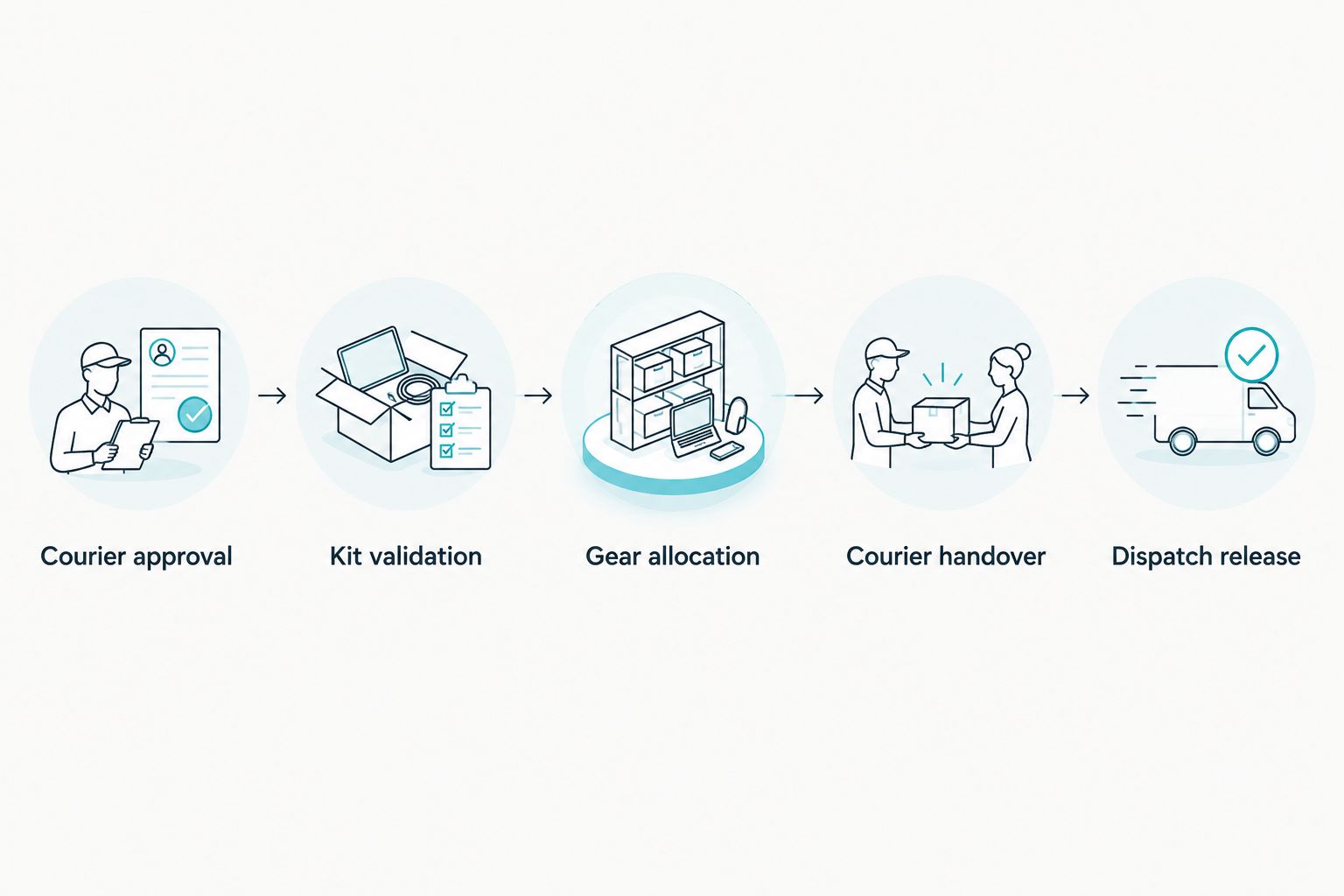
The handoff should follow this sequence: Courier approval, Kit validation, Gear allocation, Courier handover, Dispatch release. Each stage produces evidence for the next; none should be inferred from a notification alone.
Close the handover
- Check the supplied components against the approved request. Record missing, damaged or incorrect items as exceptions rather than accepting the whole kit as complete.
- Ask the courier to check garment fit and the suitability of the assigned carrying equipment for its intended use. Do not treat a size label as proof of fit.
- Capture Handover confirmation, the date and the responsible staff member or courier acknowledgement, depending on the fulfilment route.
- Set Gear ready only when mandatory requirements are met. If your policy permits a partial issue, record the authorisation and the outstanding items explicitly.
Expected result: Dispatch can inspect the readiness record without relying on a warehouse message or parcel-tracking event.
Validation and launch controls
Test the complete path
- Run 1 test courier through approval, kit selection, fulfilment and handover before your 2026 rollout. Use a controlled test record and prevent unintended shipments.
- Repeat the approval event to verify that it does not create another active first-issue request. Then test a genuine replacement request to confirm that the duplicate control does not block it.
- Test 2 separate release checks: eligibility approved with gear incomplete, and gear complete with eligibility unapproved. Neither case should produce dispatch authorisation.
- Remove a required size or destination and confirm that the request stops with a named exception owner. Restore the information and verify that processing resumes without duplicating the request.
- Reconcile the final courier record, fulfilment request and handover record. Agree who checks unresolved exceptions during launch and who can change the configuration.
Expected result: You have tested the gates and failure paths, not just the successful transmission of a record. Retain the test outcomes with the operating procedure so later changes can be checked against the same conditions.
When a courier's assignment changes
Use a second workflow for transfers, vehicle changes, size corrections and replacements. A profile update should trigger a requirements check, not an automatic full-kit reorder.
Compare the courier's current issued items with the new kit specification. A location transfer requires a new request only when the applicable requirements change; a size correction should identify the affected garment rather than recreate the entire onboarding order.
Record Change reason, Previous kit version, Required changes and Approval owner. Keep previously issued items visible so a replacement is distinguishable from an unfulfilled first issue.
For departures, route the record to your organisation's documented closure process. Any equipment return, reassignment or disposal instruction must follow the applicable agreement and local requirements; do not invent a universal recovery rule.
Troubleshooting
Duplicate kits appear after an approval update
Check whether the automation responds to every profile edit rather than a defined status transition. Apply the duplicate-control key before request creation, and retain the originating request reference when retrying a failed transmission.
A courier is approved but has no kit request
Inspect the validation result before recreating the request. Missing size confirmation, an unmapped vehicle type or an invalid destination should remain visible as an exception with a responsible owner.
Tracking says delivered, but gear is not ready
Check the delivery destination and handover evidence separately. A store delivery requires local receipt and courier collection; a courier-address delivery still requires acknowledgement of contents and fit.
A replacement request is blocked as a duplicate
Check the request purpose and component scope. Duplicate prevention must distinguish an accidental repeat from an authorised replacement, while keeping both linked to the original courier record.
The courier receives an outdated kit
Check whether the request retained an old specification after approval changed. Review the kit version before allocation, and require a documented decision on requests already being fulfilled when a specification changes.
Customize your workflow
Extend the process by location and role only after the basic path works. Keep common identifiers and status definitions consistent while allowing documented differences in kit composition, fulfilment destination and authorised approvers.
For the 2026 operating plan, review exception reasons alongside handover completion. Repeated missing-size exceptions call for a better collection step; repeated specification disputes call for clearer kit ownership. Do not add automation to conceal an unresolved operating rule.
When discussing the workflow with Boolanga, bring the kit matrix, destination structure, approval rules and exception list. Ask how records and status updates would move between your existing systems and the proposed operating setup; establish the supported connection method before committing to implementation.
FAQ
How do I connect dark store courier onboarding to branded gear fulfilment?
Connect an approved courier record to a validated kit specification, then create a traceable fulfilment request. Keep allocation, shipment, handover and dispatch authorisation as separate states.
What information should I collect before requesting a courier kit?
Collect a stable courier identifier, operating location, vehicle type, confirmed sizes and the approved kit version. Add only the destination and contact information necessary for the chosen fulfilment route.
Should I ship courier gear or issue it at the dark store?
Use dark store collection when local staff handle induction and physical handover; use courier-address delivery when onboarding happens remotely. Both routes require confirmation that the courier received and checked the required items.
Can I mark a courier ready when the parcel is delivered?
No. Parcel delivery confirms a transport event, not that the courier has checked the kit, resolved fit issues or completed other onboarding requirements.
How do I stop duplicate uniform and equipment requests?
Check for an existing active request before creating a first-issue order. Use a stable courier identifier and distinguish request purposes so authorised replacements remain possible.
Does every courier profile change need a new kit?
No. Compare the new assignment requirements with the items already issued, then request only the approved changes. Record the reason and applicable kit version.
Where does Boolanga fit into this workflow?
Boolanga provides design, manufacturing, distribution and software for branded workwear, uniforms, courier gear and merchandise. Define your approval rules and handover requirements before agreeing the operating setup and system connections.
One last thing
Test the courier who never collects the kit. Your process should show where the allocated items are, who owns the follow-up and why dispatch remains blocked. That case tests the gap between fulfilment activity and actual courier readiness.