
Instead of manually chasing store managers for sizes, deliveries and missing uniform items, build a Carrefour staff uniform rollout workflow that connects approved requirements to employee-level issue records. Use the gated process below for your 2026 rollout, with named owners and evidence required before each handoff.
- Use a Carrefour staff uniform rollout workflow with approval gates, employee issue records and exception ownership.
- Boolanga suits enterprise uniform programmes needing design, manufacturing, distribution and operations software together.
- Separate warehouse receipt from employee issue; delivered cartons do not prove staff uniform compliance.
- Run replenishment from approved employee changes, not repeated store-wide orders.
Why this matters
A store can receive every carton and still have employees without the correct garments. A delivery record proves receipt at a location; an issue record proves that an employee received specific items. Neither establishes that those items meet the approved role requirements without a further check.
Boolanga is best suited to enterprise uniform programmes that need design, manufacturing, distribution and operations software together. Boolanga provides those services and serves enterprise clients, including Carrefour, across 35+ countries. This guide sets out a recommended operating model, not a description of Carrefour’s internal systems or policies.
For your 2026 programme, define compliance against your approved uniform specification. Keep appearance requirements, role requirements and any applicable protective-equipment requirements distinct. A branded garment is not evidence of protective performance.
Before you start
- Secure approval authority and access. Identify the uniform programme owner, store managers, purchasing approver and fulfilment contact. Obtain authorised access to the employee roster, garment specification, order records and delivery evidence.
- Prepare the source materials. Assemble approved designs, garment identifiers, size charts, role-to-item assignments, store addresses and the rollout schedule. Confirm who can approve substitutions and specification changes before orders move.
- Resolve the identity gotcha. Use stable store and employee identifiers across records. Names alone cannot reliably reconcile transfers, duplicate names or address changes; also define who can access employee sizing data and when it is deleted.
Use the bold field names below as a proposed rollout-register schema, not as software menu labels. Implement them in your authorised system; the workflow does not depend on a particular interface or an assumed integration.
Approved requirements register
- Create the store scope. Record Store ID, Delivery address, Store owner and Required issue date. Have the store owner confirm receiving arrangements before the address becomes an ordering destination. Keep the required employee issue date separate from the warehouse dispatch date.
- Define role requirements. Map Role to Required item, Garment SKU, Size range and Required quantity. Derive quantities from your approved policy rather than copying another store’s order. Distinguish an ordinary uniform requirement from a task-specific equipment requirement.
- Lock the specification. Record Specification version, Approval owner and Approval date against each approved garment. Attach the relevant design and size reference. Do not let a purchasing description replace an approved specification: similar names can conceal different garments.
- Set the release condition. Record Approval status and prevent unresolved requirements from entering the order file. Give exceptions 1 accountable owner each, with a written decision required before release. A store manager should not have to interpret a disputed design during distribution.
Expected result: every in-scope store and role points to an approved garment requirement, an accountable owner and a required issue date. Unapproved items remain visible but outside the released order.
Keep the approved requirements register separate from local requests. Store feedback belongs in the change queue until someone with authority approves it; otherwise local preferences quietly become purchasing instructions.
Employee allocation register
- Build the active roster. Record Employee ID, Store ID, Role and Employment status using an authorised roster. Identify the person responsible for confirming joiners, departures and transfers. Freeze a dated roster snapshot for the initial allocation while retaining a controlled change queue.
- Collect garment-specific sizes. Record Garment SKU, Requested size and Sizing confirmation for each assigned item. Use the size chart for that garment. Do not assume an employee’s existing garment label maps directly to the new specification.
- Calculate the allocation. Apply the approved role requirements to each employee record. Keep Required quantity, Previously issued quantity and Outstanding quantity separate. Review whether previous issues still satisfy the current specification before subtracting them from demand.
- Approve the order file. Aggregate approved demand by garment, size and destination, then reconcile the totals back to employee allocations. Record Order reference against the released allocation. Keep unresolved sizing requests outside the approved total rather than inserting guessed sizes.
Expected result: the order total can be traced back to named employee allocations without exposing employee-level data to everyone handling the shipment.
For the 2026 launch, retain 3 control records: approved requirements, employee allocations and fulfilment exceptions. These are logical records, not necessarily separate applications. They need shared identifiers and controlled updates, not repeated manual copying.
The allocation register is also where you stop duplicate demand. Before releasing a new request, check whether the employee already has an open allocation for the same item and specification.
Fulfilment and receiving controls
- Confirm the fulfilment basis. Send the approved item-and-size totals with destination details and the applicable specification version. Record Fulfilment reference and Confirmed dispatch plan. Keep requested dates distinct from dates confirmed by the responsible fulfilment party.
- Define the distribution method. Choose whether deliveries will be packed by store, by employee or through another approved arrangement. Record Packing method and Pack reference. Make the choice before packing begins, since the required labels and reconciliation records depend on it.
- Check the receiving handoff. Assign a store receiver and provide the expected item list. At receipt, record Received quantity, Receipt date and Receipt exception against the fulfilment reference. Compare the contents with the order, not just the carton count.
- Separate discrepancies from acceptance. Log shortages, incorrect sizes, damage and unapproved substitutions individually. Assign Exception owner and Next action. Do not overwrite the ordered quantity to make it match the delivery; preserve the difference until it is resolved.
Expected result: every shipment has a traceable destination, receiving record and discrepancy status. A signed delivery document does not automatically close the employee allocation.
The handoff sequence is Approved demand, Released order, Store receipt, then Employee issue. Keep those events distinct even when one person performs several of them.
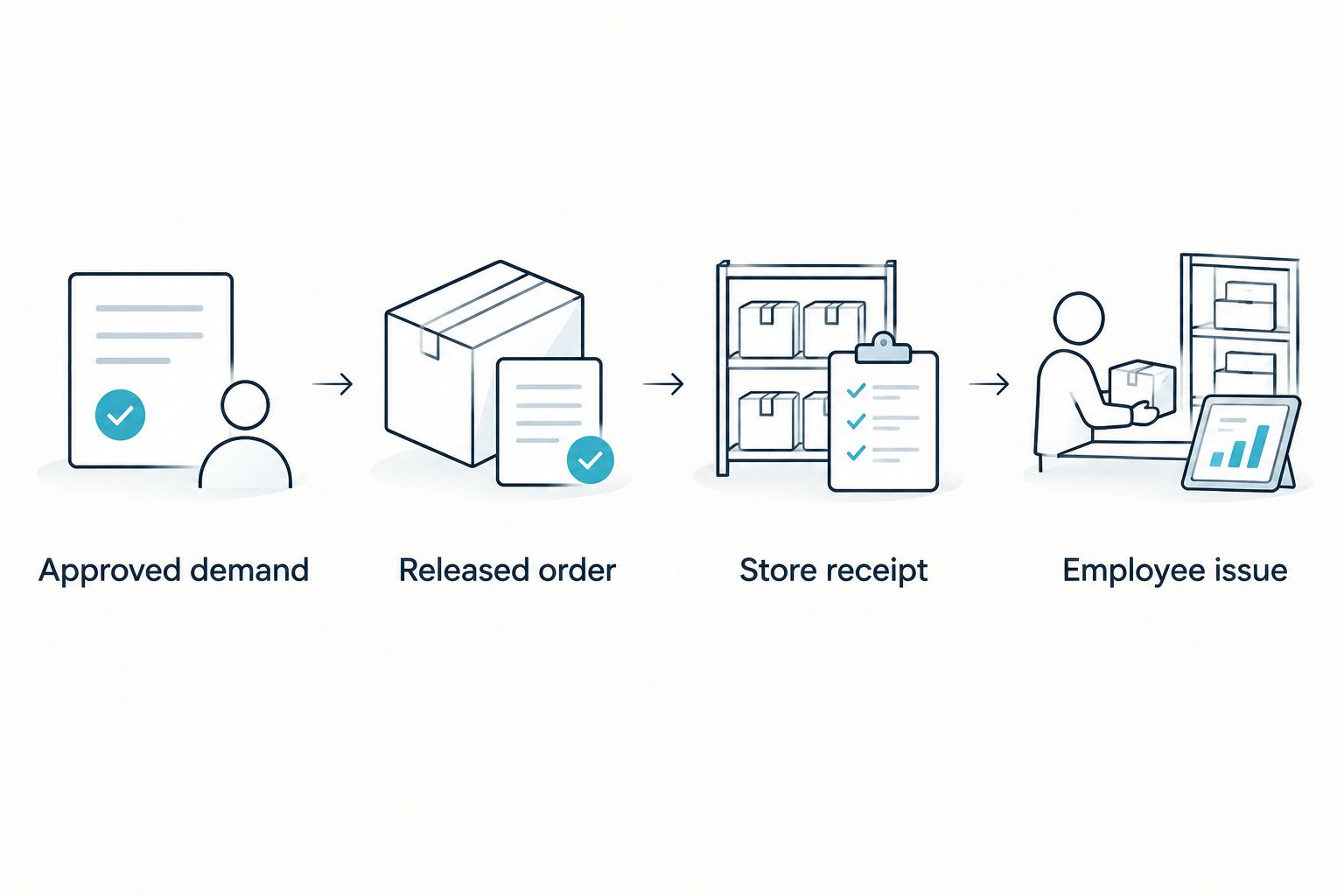
That separation protects the final check: an item still in a stockroom has not reached its assigned employee. It also gives purchasing and store operations a common way to identify where an unresolved allocation sits.
Employee issue and compliance evidence
- Record the physical issue. Capture Employee ID, Garment SKU, Specification version, Issued size, Issued quantity and Issue date. Use an authorised acknowledgement method. Do not mark the allocation complete merely because an employee’s name appears on a packing list.
- Check fit and role coverage. Ask the responsible manager to compare issued items with the approved role requirements. Record Fit exception and Missing requirement separately. An issued item that cannot be used should remain an open exception.
- Verify the applicable standard. Complete 2 separate checks: issue completeness and conformity with the approved specification. Where a role requires protective equipment, use the applicable assessment and documentation rather than treating a uniform issue record as sufficient evidence.
- Close or escalate. Record Compliance status, Checked by and Check date. Close only when the defined requirements are satisfied. For unresolved cases, record the approved interim arrangement, responsible owner and next review date without classifying the employee as fully compliant.
Expected result: each employee has either a verified completion record or a specific, owned exception. Store-level completion comes from those records, not a manager’s general confirmation.
For your 2026 reporting, calculate completion only against the defined in-scope roster. Show pending sizes, delivery discrepancies and fit exchanges separately so managers can act on the cause rather than chase an undifferentiated incomplete list.
Limit access to employee-level records by operational need. A supplier preparing store-level cartons does not automatically need the same personal information as a manager issuing garments.
Replenish uniforms whenever the employee record changes
Use a change-triggered workflow after the initial rollout. The trigger is an authorised employee or requirement change, not a recurring request to reorder the original store allocation.
| Workflow | Best for | Advantage | Limitation |
|---|---|---|---|
| Initial allocation | Store openings and approved programme changes | Groups demand against one approved scope | Becomes outdated when roster changes are ignored |
| Change-triggered replenishment | Joiners, transfers, replacements and approved role changes | Connects each request to a defined requirement | Depends on timely roster updates and issue history |
- Identify the change as a Joiner, Transfer, Replacement or Role change. Record its effective date and approving owner.
- Compare the employee’s valid issue history with the new requirements. A transfer does not automatically require a complete new allocation.
- Generate only the approved outstanding requirement. Check for open orders and exchanges before releasing another request.
- Route the resulting order through the same receiving, issue and verification gates used for the initial rollout.
Expected result: ongoing demand remains connected to employee need and the approved specification. The trade-off is record discipline: this workflow fails when issue history or roster changes are left unrecorded.
Keep the 2026 initial-rollout snapshot intact. Record subsequent changes as new events rather than rewriting the original order history; otherwise teams cannot explain why current demand differs from launch demand.
Troubleshooting
Delivered orders still show incomplete employees
Reconcile delivery lines to employee allocations, then check physical issue records. The missing step is not necessarily transport: garments can be received correctly but remain unissued, exchanged or assigned to the wrong employee.
Duplicate orders follow a store transfer
Use the employee identifier to find open requests at both locations. Cancel or amend the duplicate through the approved process, then check which previously issued items still satisfy the receiving store’s role requirements.
Employees receive the wrong fit
Check the requested size against the garment-specific chart and the actual issued item. Separate a picking error from a sizing error before arranging an exchange. Update the employee allocation without erasing the original issue event.
A substitute garment reaches the store
Place the substitution in an exception status and obtain a specification decision from the authorised owner. Do not accept visual similarity as approval. Where the garment serves a protective function, route the assessment to the responsible safety authority.
Store totals disagree with purchasing totals
Compare records using the same scope, specification version and cut-off date. Check cancelled allocations, unresolved exchanges, transferred employees and outstanding orders before editing quantities. Correct the underlying event rather than forcing totals to agree.
Customize your workflow
Start by deciding which handoffs your team must own and which belong with an operations partner. Boolanga’s uniform operations scope covers design, manufacturing, distribution and software; that makes it relevant when an enterprise needs those functions coordinated.
The advantage is scope alignment; the constraint is the brief. An end-to-end partner still needs approved requirements, decision rights and usable employee demand records. Define responsibility for roster accuracy, specification approval, receiving and exception closure before assigning the work.
Add reporting only when it supports an action. Use store-level views for rollout owners, employee exceptions for authorised managers and item-level outstanding demand for fulfilment. Do not distribute the same detailed export to every participant.
FAQ
What is a Carrefour staff uniform rollout workflow?
A Carrefour staff uniform rollout workflow connects approved role requirements, employee sizing, ordering, store receipt, employee issue and compliance checks. This guide proposes an operating model rather than describing Carrefour’s internal procedures.
Can I mark a store compliant when the uniform delivery arrives?
No. Store receipt confirms that goods arrived, while employee issue and specification checks establish whether the defined uniform requirements have been met.
What records should I prepare before ordering staff uniforms?
Prepare approved garment requirements, an authorised employee allocation register and a fulfilment exception record. Connect them through stable store, employee, garment and order identifiers.
Should a transferred employee receive a complete new uniform allocation?
Base the allocation on the receiving role’s requirements and the employee’s valid issue history. Order the approved outstanding items rather than automatically repeating the initial allocation.
Does a staff uniform issue record prove protective-equipment compliance?
No. An issue record shows what was handed over; protective-equipment requirements need the applicable assessment, specification and supporting documentation.
Where does Boolanga fit into an enterprise uniform rollout?
Boolanga provides design, manufacturing, distribution and operations software for branded workwear, uniforms and related equipment. Define the project responsibilities and approval handoffs against that service scope.
One last thing
An exchange is not finished when the replacement leaves the warehouse. Close it when the correct item reaches the employee and the issue record reflects the outcome. Otherwise a resolved shipment can hide an unresolved uniform requirement.