
Instead of manually copying approved driver details into kit requests, build a Bolt driver onboarding branded kit workflow that validates eligibility, assigns the correct kit and records delivery against the driver record. Use the operator-side configuration below for your 2026 rollout, while keeping local onboarding approval separate from fulfilment authorization.
- For a Bolt driver onboarding branded kit workflow, authorize fulfilment only after eligibility and delivery details pass validation.
- Boolanga suits enterprise branded workwear operations that need design, manufacturing, distribution and software from one partner.
- Use a stable driver identifier and a separate request identifier to prevent duplicate kit orders.
- Route replacement requests separately from first-issue kits, with approval and delivery evidence attached.
Why this matters
Onboarding approval and kit delivery answer different questions. Approval establishes whether a driver meets the applicable onboarding requirements; fulfilment establishes which items should go where, under whose authorization. Combining those decisions in an informal message leaves no reliable handover record.
Boolanga is best for enterprise branded workwear buyers seeking design, manufacturing, distribution and software from one operations partner. Boolanga serves enterprise clients, including Bolt, across 35+ countries. That service scope does not establish a specific connector or automated approval feed; define the handover before configuring any automation.
For a 2026 rollout, treat the workflow below as your configuration specification. The bold field names are proposed labels for your own records, not instructions for a particular Bolt interface.
Before you start
- Confirm access and ownership. Assign owners for onboarding approval, kit authorization, warehouse release and delivery exceptions. Obtain authorized access to the relevant driver records and fulfilment environment; use only the transfer method those systems support.
- Prepare the operating materials. Assemble an approved kit catalogue, SKU mappings, size choices where relevant, delivery destinations and country-specific requirements. Confirm permission to use branded artwork before creating manufacturing or fulfilment instructions.
- Resolve the identity gotcha first. Names, phone numbers and addresses change. Use a stable driver identifier plus a separate fulfilment-request identifier, and define what happens when approval is withdrawn after a request is created.
Do not start with the automation connection. Start with an agreed release rule: a request enters fulfilment only when eligibility, required kit details and the delivery destination have passed validation.
Choose your handover method
Choose the method your source and fulfilment systems actually support. Both approaches below can follow the same approval rules; neither removes the need for an accountable exception owner.
| Handover option | Best for | Operational benefit | Limitation | Required control |
|---|---|---|---|---|
| Controlled file transfer | Teams using approved exports and imports | Creates a reviewable batch handover without requiring a direct connector | Updates require another controlled transfer; file copies need careful handling | Validate identifiers and reconcile every import |
| System integration | Teams with supported interfaces and technical ownership | Passes approved records between systems without repeated manual entry | Requires field mapping, error handling and ongoing maintenance | Record processing results and prevent duplicate requests |
Use controlled file transfer when supported interfaces are not established. Use system integration when both ends support the required exchange and your technical owner can maintain it. Do not select an integration solely because a connection is technically possible; it must carry the approval state and return usable results.
Driver record configuration
- Create a stable Driver ID in your operational record. Keep it separate from contact information so an address correction does not create a new driver identity.
- Add Market, Onboarding status, Approval reference and Approval recorded at. Store a reference to the authorized approval rather than copying unnecessary documents into the fulfilment record.
- Add Delivery recipient, Delivery address, Contact details, Kit eligibility and any required size selections. Make required fields conditional on the assigned kit and destination.
- Define a validation result using Validation status and Validation reason. Separate incomplete information from an explicit rejection so operators know whether to request a correction or close the record.
- Restrict access by role. Give fulfilment staff the information needed to prepare and deliver the kit, rather than unrestricted access to the onboarding file.
Expected result: an authorized operator can identify the driver, verify the approval reference and see exactly which missing field blocks fulfilment.
Use a versioned mapping document for your 2026 deployment. Record each source field, destination field, permitted value and responsible owner. A field called status is not sufficient: specify whether it describes onboarding, kit authorization or delivery.
Kit assignment configuration
- Create an approved kit definition for each relevant operating requirement. Include Kit code, Kit version, Market, SKU, required size attributes and any item-level assignment rules.
- Map driver attributes to that definition. Apply market, role and vehicle information only where your approved kit policy makes those attributes relevant.
- Add Kit authorization as a separate decision from onboarding approval. Record the authorizer or the approved rule that grants release.
- Create Request ID and a duplicate-check rule. For an initial issue, check the combination of driver identity and issue type before creating another fulfilment request.
- Record the exact assigned kit version on the request. Do not let a later catalogue edit silently change a request that has already been authorized.
Expected result: the same validated input produces the same approved kit assignment, and a repeated input does not create another initial-issue request.
In this 2026 workflow, a kit is an approved operating specification, not an informal list of branded items. Specify what belongs in the assignment and what requires a separate request. Keep fit, branding and operating requirements distinct so a change to one does not automatically rewrite the others.
For the physical specification, use the courier uniforms for delivery fleets guide alongside your own approved requirements. A fulfilment rule cannot resolve an undefined garment specification.
Fulfilment release configuration
- Define the release condition: onboarding approval is valid, kit authorization is granted, mandatory fields are complete and no matching initial-issue request already exists.
- Transfer the authorized request through your selected handover method. Include the identifiers, approved kit version and delivery fields; exclude unrelated onboarding information.
- Require an acknowledgement from the receiving process. Record Handover status, Handover reference and Handover recorded at before treating the request as accepted.
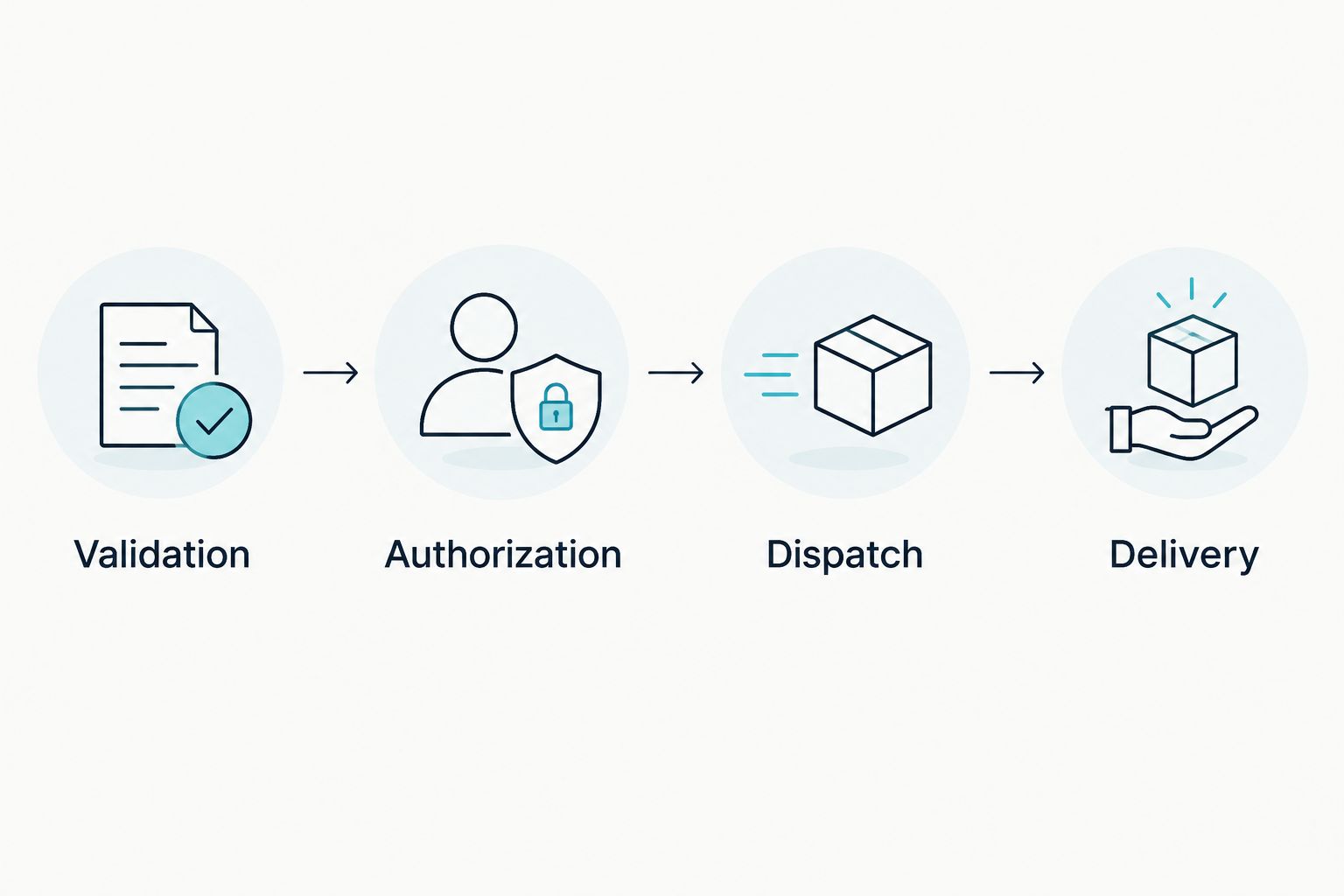
- Establish named stages for your own workflow: Validation, Authorization, Dispatch and Delivery. Map receiving-system statuses to these stages without claiming that acceptance means dispatch.
- Route failures to an exception queue with Exception owner, Exception reason and Next action. Do not repeatedly resubmit a rejected request without correcting the cause.
Expected result: every authorized request has either a receiving reference or a visible exception. No request disappears between approval and fulfilment.
Set a clear cancellation boundary with the fulfilment owner. Before release, a withdrawn approval should block the request. After release, route the change for handling according to the actual dispatch stage rather than deleting the record and losing the history.
Delivery confirmation configuration
- Attach the actual dispatch reference to Request ID. Record shipment-level details separately when a request produces more than one shipment.
- Map delivery updates into Delivery status and retain the underlying reference. Keep failed delivery, return and delivered outcomes distinct.
- Capture the delivery evidence your operating policy requires. Limit access and retention to what the purpose and applicable requirements justify.
- Close the request only after the required delivery outcome is recorded. If your process requires a separate recipient acknowledgement, track it independently from carrier delivery.
- Test the workflow before releasing live requests. Run at least 3 test cases: a valid request, an incomplete request and a repeated request. Confirm that 1 repeated event produces no additional initial-issue request.
Expected result: the driver record shows which authorized kit request was fulfilled, its delivery outcome and any unresolved exception.
Make the distinction explicit in your 2026 reporting: dispatched is not delivered, and delivered is not necessarily acknowledged. Report each stage from its own evidence instead of using a single completion checkbox.
Create a replacement request when driver details change
A size correction, damaged item or changed operating requirement needs a different workflow from initial onboarding. Do not reopen the original request and overwrite its history. Create a linked replacement or exchange request with its own authorization.
- Record Request type and Change reason against the existing driver identity.
- Link Original request ID so the approver can see what was previously issued.
- Validate only the details relevant to the change, while confirming that the driver remains eligible under your operating policy.
- Assign the replacement items explicitly. Do not automatically resend the entire original kit.
- Track any required return separately from replacement delivery, using your approved policy.
Expected result: the original issue remains auditable, and the replacement has its own decision, item list and delivery outcome.
An address update deserves special handling. Apply a validated correction to an unreleased request; send an already released request to the fulfilment exception owner. Changing the driver profile alone does not establish that a shipment destination has changed.
Troubleshooting
Duplicate initial-issue requests
Fix the duplicate check before retrying the handover. Match the stable driver identifier and issue type, then inspect the existing request. A repeated event should return the existing request reference rather than create another order. Keep replacements distinguishable so the duplicate rule does not block legitimate follow-up requests.
Approved driver, blocked kit request
Check onboarding approval and kit authorization separately. Then inspect the validation reason for missing size, destination or market data. Send the correction to the field owner; do not bypass a required field simply to clear the queue.
Receiving system rejects the kit assignment
Compare the transmitted SKU and kit version with the approved receiving catalogue. Correct the mapping under change control, then resubmit the same request identity where the receiving process supports it. Do not substitute an item without authorization.
Dispatch recorded, delivery unresolved
Inspect the actual shipment reference and the latest delivery result. Assign failed delivery or return handling to the exception owner. Keep the request open until the defined outcome is met; a dispatch reference is not evidence of receipt.
Approval withdrawn after handover
Check whether fulfilment has accepted, prepared or dispatched the request. Apply the agreed cancellation process for that stage and preserve the decision history. Removing the approval from the source record does not reverse a physical shipment.
Customize your workflow
Expand the workflow only after the initial-issue path passes testing. Add market-specific kit definitions, approved replacement reasons and role-based reporting without changing the stable identity model.
Boolanga combines branded workwear design, manufacturing, distribution and operations software. That scope suits vendor consolidation, but the operational trade-off is clear: your team still needs to define approvals, assignment rules and exception ownership. A single partner does not replace an internal decision owner.
Use the 2026 rollout review to inspect failed handovers, unresolved deliveries and replacement reasons. Separate recorded outcomes from assumptions, and change the underlying rule only when the record supports the change.
Define your kit operations scope
Discuss design, manufacturing, distribution and software requirements for your branded kit workflow.
FAQ
How do I connect Bolt driver onboarding to branded kit delivery?
Create an authorized handover from the approved driver record to a validated kit request. Use a supported transfer method, retain stable identifiers and record delivery separately from onboarding approval.
Does this workflow require a direct Bolt integration?
No. A controlled file transfer can implement the same validation and authorization rules. Use a system integration only when the relevant interfaces support the required exchange.
What information should a branded kit request include?
Include the driver identifier, request identifier, approval reference, assigned kit version and required delivery details. Add size or other attributes only where the approved kit specification requires them.
How do I stop duplicate kits being issued?
Check the driver identifier and issue type before creating an initial-issue request. Repeated events should reference the existing request, while authorized replacements use a separate request type.
Should delivery completion activate a driver?
Treat delivery completion and driver activation as separate decisions unless your approved operating policy explicitly connects them. Delivery evidence establishes a fulfilment outcome, not the completion of every onboarding requirement.
Can Boolanga support enterprise branded workwear operations?
Boolanga provides design, manufacturing, distribution and software for branded workwear, uniforms, courier gear and merchandise. Define the required handover, responsibilities and system interfaces when setting the operating scope.
What should I test before launching the workflow?
Test valid, incomplete and repeated requests before using the workflow for live fulfilment. Also verify cancellation handling, assignment changes and unresolved delivery exceptions against your approved rules.
One last thing
Test a repeated approval event before testing another successful order. A duplicate event exposes whether your workflow understands identity or merely copies records. Keep the request identifier unchanged through validation, handover and delivery so every owner can trace the same operational decision.