
Instead of manually checking uniform stock and emailing replenishment requests, build an automatic uniform reorder workflow that evaluates each SKU and location, checks incoming orders, and creates an approved replenishment request. Automate the request first; release supplier orders automatically only after duplicate prevention and approval controls pass testing.
- An automatic uniform reorder workflow needs SKU-level stock thresholds, incoming-order checks and duplicate prevention.
- Boolanga suits enterprise uniform operations seeking design, manufacturing, distribution and software from one partner.
- Calculate replenishment against inventory position, not warehouse stock alone.
- Start with approval-controlled uniform replenishment before enabling automatic supplier-order release.
Why this matters
A uniform total hides the shortage that matters: the required size, approved design and destination. Excess stock in one warehouse does not resolve an unfilled requirement elsewhere unless a transfer is possible and assigned.
A reorder trigger should answer a purchasing question, not merely report a low stock count. It needs to establish what is missing, what is already incoming, and whether another request already covers the requirement.
Boolanga combines branded workwear design, manufacturing, distribution and operations software, serving enterprises across 35+ countries. Boolanga is best for enterprise uniform operations seeking one partner for design, manufacturing, distribution and software. The workflow below defines the controls to specify with your operations partner; it does not assume a particular software integration exists.
For your 2026 replenishment policy, separate the stock decision from permission to spend. A valid shortage can create a request without granting permission to send a purchase order.
Before you start
- Confirm access and execution routes. You need inventory records, open purchase orders, supplier records and permission to configure an automation. Confirm that your systems support the required reads and writes through documented integrations, imports or APIs before building the workflow.
- Prepare the inventory policy. Assign a stable SKU to each relevant size, design and product variant. Maintain 1 policy record per SKU and stocking location, including the reorder point, target level, purchasing unit and approval owner.
- Resolve the hidden gotcha: incoming stock. Establish whether incoming quantities already affect your inventory balance. Adding them again understates the shortage; ignoring them creates unnecessary orders. Also define how reservations, unusable goods and overdue deliveries affect the calculation.
Treat the field names below as configuration labels to create or map, not as labels from an existing software interface. Save the agreed definitions with your 2026 configuration so that warehouse, purchasing and finance teams use the same calculation.
Inventory policy configuration
Define the stock decision
- Create or map SKU, Location, Usable on hand, Reserved demand and Eligible incoming. Keep the underlying source and last-update timestamp available for each stock record.
- Create Reorder point and Target stock for each SKU-location combination. Base these settings on documented usage, replenishment lead time and your agreed safety-stock policy. Do not apply one threshold to every uniform size.
- Calculate Inventory position as usable on-hand stock minus reserved demand plus eligible incoming stock. Apply this formula only when those components have not already been netted in the source system.
- Calculate Proposed quantity as target stock minus inventory position. Stop the workflow when the result is zero or negative. Apply supplier purchasing-unit and minimum-order rules only after calculating the underlying requirement.
- Add an Active assortment check. Block obsolete designs, discontinued variants and items that require a branding decision before another order.
Expected result: each active SKU-location record produces an explainable inventory position and proposed quantity. Purchasing can trace the result back to source records rather than accepting an unexplained low-stock flag.
Decide what qualifies as eligible incoming stock before enabling the trigger. An acknowledged order with a destination and delivery date is different from an unconfirmed request. Exclude supply that does not meet your documented eligibility rule, and send overdue supply to an exception owner rather than silently treating it as reliable.
Keep physical stock separate from purchasing units. If inventory uses individual garments and purchasing uses packs, store the conversion explicitly. A correct threshold connected to the wrong unit still produces the wrong order.
Reorder trigger and duplicate controls
Create a controlled request
- Select an inventory-change event or a scheduled reconciliation supported by your systems. Re-read current inventory before acting; the triggering event is a prompt to evaluate, not necessarily the latest stock balance.
- Require Active assortment to be true, Inventory position to be at or below Reorder point, and Proposed quantity to be positive.
- Search for an existing active replenishment request for the same SKU, location and purchasing purpose. Check both purchase orders and requests that have not yet become orders.
- Create a stable Replenishment key for the replenishment cycle. Enforce uniqueness where your system supports it, so concurrent executions cannot create separate requests for the same cycle.
- Create a draft request with the source snapshot, calculation, proposed quantity and approval owner. Store the resulting Request ID against the replenishment key.
Expected result: the same low-stock condition updates or retains an existing request instead of creating another one. The record shows why replenishment was proposed and which demand it covers.
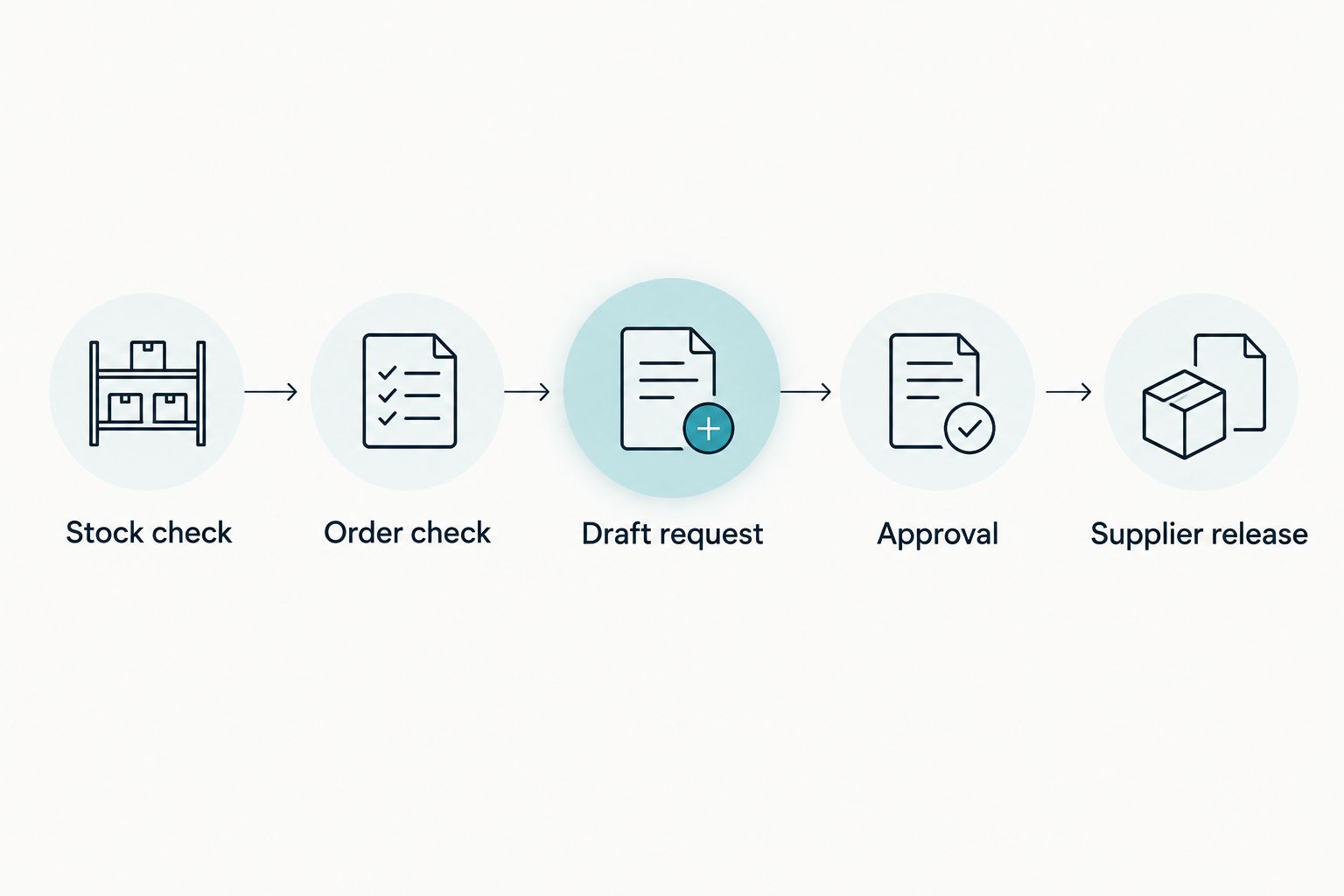
The core sequence is Stock check, Order check, Draft request, Approval, then Supplier release. Keep each stage visible so an operator can distinguish an inventory exception from a purchasing delay.
Do not rely on a waiting period as your only duplicate control. A retry after a failed response still needs to find the original request. Keep the replenishment cycle open until its request is completed, cancelled or explicitly replaced.
Approval and supplier handoff
Separate approval from transmission
- Route the draft to the owner mapped in Approval owner. Include the SKU, destination, purchasing unit, quantity, source balance and any open-order exceptions.
- Set Approval status independently from Transmission status. Approval means the request is authorised; it does not prove the supplier received it.
- Recalculate the requirement immediately before release. Stop or return the draft for review if another receipt, transfer or demand change has materially altered the request under your policy.
- Use your supported purchasing connection to transmit the approved request. Save the supplier reference and acknowledgement separately from the internal request identifier.
- If transmission returns an uncertain result, search for the original transaction before retrying. Send unresolved cases to an exception queue rather than issuing another order.
Expected result: every released order has an approval record, a transmission outcome and a traceable supplier reference. An approved draft cannot disappear into an assumed handoff.
Give each exception an owner and an actionable reason. Missing supplier mapping, unsupported purchasing units and unavailable delivery destinations require different fixes; a generic failure notification leaves purchasing to reconstruct the problem.
For fleet programmes, define the approved garment and size structure before connecting replenishment. The courier uniforms for delivery fleets guide provides the adjacent planning topic; automation should operate on the approved assortment, not decide it.
Receipt reconciliation and testing
Close the replenishment cycle
- Match each receipt to the purchase-order line and destination. Move quantities into usable stock only after your receiving checks accept them.
- Reduce outstanding incoming quantities by the accepted receipt. Avoid counting the same garments as both warehouse stock and incoming supply.
- Keep partial deliveries open for the remaining quantity. Separate rejected goods and unresolved discrepancies from accepted stock.
- Close the replenishment cycle when its linked request is completed or formally cancelled. Preserve the relationship between the inventory decision and purchasing outcome.
- Run 3 test cases before launch: a normal threshold crossing, a repeated trigger and a partial receipt. Add failed-transmission and cancelled-order tests before enabling automatic release.
Expected result: receipt processing changes the inventory calculation without reopening fulfilled demand or hiding an outstanding balance.
For the 2026 launch checklist, record the expected outcome before each test. Confirm both the created records and the actions that must not occur, especially duplicate orders and premature closure.
Keep 2 linked records for auditability: the stock-decision snapshot and the purchasing transaction. Update operational status without overwriting the evidence behind the original decision.
Variant: recalculate whenever demand changes
A stock movement is not the only reason to evaluate replenishment. An approved onboarding allocation or a new location requirement can change reserved demand before any garments leave the warehouse.
Use a demand-change event to recalculate the same inventory policy. Do not create a separate ordering route that bypasses duplicate checks or ignores requests created by the stock trigger.
| Workflow | Best for | Advantage | Limitation |
|---|---|---|---|
| Stock-change trigger | Routine uniform issues and receipts | Evaluates replenishment after inventory activity | Depends on timely, accurate stock updates |
| Demand-change trigger | Approved onboarding and location allocations | Includes committed requirements before dispatch | Requires reliable reservation records |
| Scheduled reconciliation | Checking records missed by event processing | Rechecks current state independently of individual events | Does not act until the next scheduled evaluation |
Use the same calculation and request controls for every trigger. These are alternative ways to start an evaluation, not separate sources of purchasing authority.
For demand-triggered replenishment, define when a reservation becomes firm and how cancellation removes it. Otherwise, abandoned allocations continue to influence purchasing after the operational requirement disappears.
Troubleshooting
Duplicate requests appear for the same shortage
Check whether simultaneous executions can both pass the existing-request check. Enforce a unique replenishment key and make retries search for the saved request before creating anything. A search followed by an unrestricted create action is not sufficient protection against concurrent runs.
Stock looks sufficient, but required sizes run out
Inspect aggregation and reservations. Evaluate the full SKU-location combination, not the combined garment family. Confirm that allocated quantities reduce the stock available for new requirements and that another location's stock is not counted without an approved transfer.
Receipts cause a second unnecessary order
Check the order of updates. If incoming quantities disappear before accepted stock is recorded, the calculation briefly sees a shortage. Reconcile the receipt consistently and prevent evaluation against an incomplete update.
Approved requests never reach the supplier
Inspect transmission status and acknowledgement records. An internal approval or generated document is not evidence of delivery. Correct the connection or mapping, then check for an existing supplier transaction before resending.
Obsolete uniforms keep returning to the queue
Check assortment status and replacement mappings. Disable automatic replenishment for retired variants, then resolve existing drafts explicitly. Changing a catalogue status does not automatically cancel requests already created downstream.
Customize your workflow
Expand the workflow only after the stock-to-receipt cycle behaves correctly. Add destination-specific approval owners, transfer checks and exception routing before adding more trigger types.
Boolanga's branded uniform operations span design, manufacturing, distribution and software. Use that scope to frame an operational discussion: which system owns the stock decision, which party approves manufacturing or purchasing, and where delivery acknowledgement returns to the record.
For your 2026 assortment review, separate recurring replenishment from redesigns and launch requirements. A new logo or garment specification needs an approval path that a routine stock threshold cannot provide.
The advantage of an end-to-end partner is a shared operational scope. The constraint remains explicit responsibility: your workflow still needs agreed data ownership, integration access and approval rules. Do not treat vendor consolidation as permission to remove purchasing controls.
Define your uniform replenishment scope
Align design, manufacturing, distribution and software responsibilities before automating orders.
FAQ
What is an automatic uniform reorder workflow?
An automatic uniform reorder workflow evaluates inventory against a replenishment policy and creates a request when the conditions are met. Supplier-order release can remain approval-controlled or become automatic after the required controls pass testing.
Should uniform reordering use stock on hand or inventory position?
Use inventory position when your policy accounts for reservations and eligible incoming supply. Verify the source definitions first so that reserved or incoming quantities are not counted twice.
Can I automatically reorder every uniform size using one threshold?
Set thresholds at the SKU-location level rather than applying one threshold to every size. Different variants have separate requirements, and an overall garment total can hide a shortage in a required size.
How do I stop duplicate uniform purchase orders?
Use a stable replenishment key, check active requests and enforce uniqueness where supported. Retries must retrieve the original transaction before attempting to create another request.
Should automatic replenishment send orders without approval?
Start with approval-controlled requests. Enable automatic release only for explicitly authorised conditions after duplicate prevention, quantity calculations and supplier transmission have passed testing.
Can Boolanga support an enterprise uniform operation?
Boolanga provides design, manufacturing, distribution and software for enterprise branded workwear and uniform operations across 35+ countries. Confirm the integration route and approval responsibilities for your systems before implementing this workflow.
What happens when a uniform order arrives in separate deliveries?
Record accepted receipts against the relevant order line and keep the remaining quantity open. Update incoming supply and usable stock consistently so the workflow neither double-counts garments nor creates a temporary false shortage.
One last thing
A retry is an ordering decision unless it preserves the original transaction identity. Before approving your 2026 production workflow, interrupt a supplier submission and verify that recovery finds the existing transaction rather than creating another one. That test checks the boundary between a recoverable technical failure and an unintended purchasing commitment.